

PickPerfect — Color Picker for Developers

Overview
Pick colors from any screen pixel. Copy as HEX, RGB, HSL instantly. Zero bloat, zero tracking, zero DOM injection.
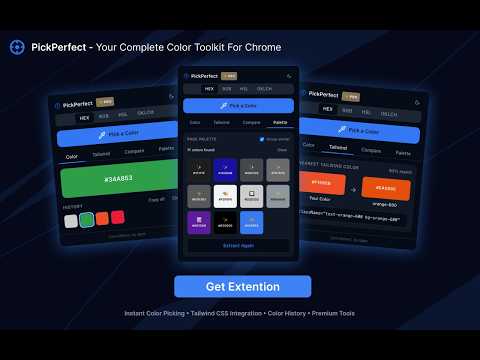
🎯 Pick any pixel on your screen instantly without injecting scripts into your pages. PickPerfect is a fast, lightweight color picker for developers and designers who care about clean code, reliable clipboard copying, and a frictionless workflow. No bloated UI, no tracking, no always-on content scripts — just pick, copy, and keep building. 🖥️ PICK ANYWHERE, NOT JUST THE BROWSER Most color picker extensions are limited to the browser tab. PickPerfect uses Chrome’s native EyeDropper API, so you can sample colors from anywhere visible on your screen: websites, desktop apps, Figma, Slack, PDFs, videos, images, and more. 🛡️ ZERO DOM INJECTION FOR CORE PICKING Traditional color pickers often inject scripts or attributes into every page you visit. That can interfere with React, Next.js, Vue, Angular, and other frontend workflows. PickPerfect’s core picker uses the native browser API: 🚫 No DOM modification for color picking 🔒 No always-on content script ⚡ No framework interference 🙅♂️ No tracking, analytics, or ads 📦 Lightweight extension package built with Svelte 5 🛠️ HOW IT WORKS Press Ctrl+Shift+X or click the extension icon Click any pixel on your screen Copy the color as HEX, RGB, or HSL ✨ FREE FEATURES 🎨 Pick colors from your entire screen 📋 Copy as HEX, RGB, or HSL ⏳ Save your last 20 picked colors locally 💾 Keep your preferred format between sessions 📱 Clean, compact popup UI ⌨️ Customizable keyboard shortcut via chrome://extensions/shortcuts 🚀 PREMIUM UPGRADE ($2.99 ONE-TIME) Supercharge your design system and frontend workflow: ⚖️ WCAG Contrast Checker — real-time AA/AAA accessibility ratings for text and backgrounds 🎨 Tailwind CSS Mapping — find the nearest Tailwind color with match accuracy 🔍 Page Palette Extraction — extract and group page colors for text, borders, and backgrounds on demand 🔒 PRIVACY FIRST PickPerfect does not collect personal data: 🚫 No tracking or analytics 📺 No ads ☁️ No uploaded color history 🔑 Minimal permissions ⚙️ Palette extraction runs only when you request it ⚙️ TECHNICAL DETAILS Chrome Manifest V3 Native EyeDropper API Requires Chrome 95+ Works on Windows, macOS, Linux, and ChromeOS Built for developers who want color tools that stay out of the way.
5 out of 52 ratings
Details
- Version2.3.0
- UpdatedMay 25, 2026
- FeaturesOffers in-app purchases
- Size82.37KiB
- Languages12 languages
- DeveloperWebsite
Email
5797565@gmail.com - Non-traderThis developer has not identified itself as a trader. For consumers in the European Union, please note that consumer rights do not apply to contracts between you and this developer.
Privacy

This developer declares that your data is
- Not being sold to third parties, outside of the approved use cases
- Not being used or transferred for purposes that are unrelated to the item's core functionality
- Not being used or transferred to determine creditworthiness or for lending purposes
Support
For help with questions, suggestions, or problems, visit the developer's support site