Item logo image for Pickora: All-in-one Color Picker

Pickora: All-in-one Color Picker

Item media 2 (screenshot) for Pickora: All-in-one Color Picker
Item video thumbnail
Item media 2 (screenshot) for Pickora: All-in-one Color Picker
Item video thumbnail
Item media 2 (screenshot) for Pickora: All-in-one Color Picker

Overview

All-in-one color picker with custom colors, last six history, and clear option.

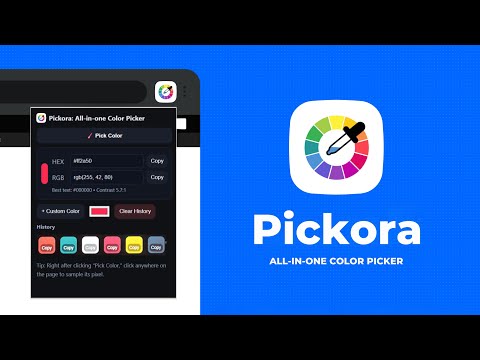
Pickora – All-in-one Color Picker is a lightweight and easy-to-use Chrome extension designed for designers, developers, and anyone who works with colors online. With a clean interface and essential features, Pickora makes color management effortless. Key Features: • Color Picker – Instantly pick any color from your screen. • Custom Colors – Add and manage your own custom colors. • History Support – View your last six picked colors at a glance. • Clear History – Remove saved colors anytime with one click. • Quick Copy – Copy HEX or RGB values instantly and use them in your projects. Why Use Pickora? Unlike heavy design tools, Pickora is fast, simple, and works directly inside your browser. Whether you’re creating a website, designing graphics, or working on UI/UX, this tool helps you manage and reuse your favorite colors without distractions. Who Can Use It? • Web Designers & Developers • Graphic Designers • Digital Marketers • Students & Creators working with colors About Us: Pickora is proudly developed and maintained by Oflox® – India’s #1 Trusted Digital Marketing Company. We specialize in creating innovative digital solutions, tools, and services that help businesses, creators, and developers work smarter and faster. For support, feedback, or business inquiries, please reach out to us at: 📧 support@oflox.com

Details

  • Version
    1.0.0
  • Updated
    September 8, 2025
  • Offered by
    Oflox.com
  • Size
    21.12KiB
  • Languages
    English
  • Developer
    Oflox
    Selaqui Dehradun, Uttarakhand 248197 IN
    Email
    ofloxindia@gmail.com
  • Non-trader
    This developer has not identified itself as a trader. For consumers in the European Union, please note that consumer rights do not apply to contracts between you and this developer.

Privacy

The developer has disclosed that it will not collect or use your data. To learn more, see the developer’s privacy policy.

This developer declares that your data is

  • Not being sold to third parties, outside of the approved use cases
  • Not being used or transferred for purposes that are unrelated to the item's core functionality
  • Not being used or transferred to determine creditworthiness or for lending purposes

Support

Related

Color Picker

0.0

Pick colors and save history.

Google Color Picker

5.0

Google Color Picker: Quickly pick and save HEX colors from websites with precision and ease. Perfect for designers and developers!

Color Pocket: Color Picker & Eyedropper

5.0

Advanced color picker and eyedropper extension for your creative workflow.

Color Picker: HEX & RGB Codes

5.0

Easily pick colors from any webpage, save your favorites, and get HEX and RGB codes instantly

Color Picker - Eyedropper

4.8

A simple and convenient color picker. Use the interactive color picker to select, adjust, and export color codes.

Color Keeper: Color Palette Manager

5.0

Select and preserve your colors with ease in custom, well-organized color palettes.

Color Picker

5.0

Pick colors from any webpage

MyColorPick: One-Click Color Picker & Dropper Tool

4.8

Pick and copy any color from websites and images instantly with MyColorPick — simple and fast.

ColorPickPro - Simple Color Picker & Dropper Tool

5.0

Pick and copy any color from websites and images - fast and easy with ColorPickPro.

Color Picker | PixelApps

5.0

A simple color picker extension. Easily pick any color on the screen, view a previous history, and copy or clear them with a click.

Simple Color Picker

5.0

A Simple Color Picker extension to pick colors and copy them to clipboard

Color Picker - Web Development

5.0

Free eyedropper tool for capturing website colors. Features live color picking, plus color history.

Color Picker

0.0

Pick colors and save history.

Google Color Picker

5.0

Google Color Picker: Quickly pick and save HEX colors from websites with precision and ease. Perfect for designers and developers!

Color Pocket: Color Picker & Eyedropper

5.0

Advanced color picker and eyedropper extension for your creative workflow.

Color Picker: HEX & RGB Codes

5.0

Easily pick colors from any webpage, save your favorites, and get HEX and RGB codes instantly

Color Picker - Eyedropper

4.8

A simple and convenient color picker. Use the interactive color picker to select, adjust, and export color codes.

Color Keeper: Color Palette Manager

5.0

Select and preserve your colors with ease in custom, well-organized color palettes.

Color Picker

5.0

Pick colors from any webpage

MyColorPick: One-Click Color Picker & Dropper Tool

4.8

Pick and copy any color from websites and images instantly with MyColorPick — simple and fast.

Google apps