Item logo image for Pick Local

Pick Local

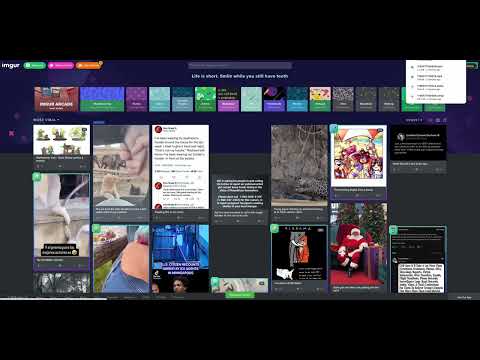
Item media 3 (screenshot) for Pick Local
Item video thumbnail
Item media 2 (screenshot) for Pick Local
Item media 3 (screenshot) for Pick Local
Item video thumbnail
Item media 2 (screenshot) for Pick Local
Item media 3 (screenshot) for Pick Local

Overview

Why take a print screen when you can download the original image. Pick Local should help you to download the images with one click!

Pick Local is a media downloader designed to help you save content from your favorite social media platforms. Unlike basic downloaders, Pick Local uses a hybrid detection engine that combines network sniffing with smart page scanning to find images and videos. Usage: Mac: one-time 'ctrl + ;' and click on the green area Windows: one-time 'ctrl + ;' and click on the green area

Details

  • Version
    4.0.2
  • Updated
    December 23, 2025
  • Offered by
    tenaz3.comp
  • Size
    61.76KiB
  • Languages
    English
  • Developer
    tenaz3
    Stresemannstr 72 Berlin 10963 DE
    Email
    tenaz3.comp@gmail.com
  • Non-trader
    This developer has not identified itself as a trader. For consumers in the European Union, please note that consumer rights do not apply to contracts between you and this developer.

Privacy

The developer has disclosed that it will not collect or use your data.

This developer declares that your data is

  • Not being sold to third parties, outside of the approved use cases
  • Not being used or transferred for purposes that are unrelated to the item's core functionality
  • Not being used or transferred to determine creditworthiness or for lending purposes

Support

Related

One-Click Image Saver

4.3

A browser extension to save images with one click.

Full-page screen capture by ScreenshotOne

5.0

Render full-page screenshots as a single image. No more scrolling and resizing. Just click and download.

Save Image to Downloads

4.7

Adds a right-click option to instantly download images.

Social Media Downloader

4.4

Downloads medias from social networks like Facebook, Instagram, Twitter & many more in just one click.

One-click image downloader - Grabit

3.5

Easily download images with one click or drag & drop! Prioritizes full-size images, with bulk download and auto-scroll support.

Quick Image Downloader

4.3

Browse and download all images from the page in one click

Image Downloader Manager [IDM] Extension

3.8

Download All Images from a WebPage in Just ONE Click.

Double Click Image Downloader

3.3

Quickly download images with a double-click. No prompts, no hassle - just double-click any image to save it instantly.

Bulk Image Downloader

3.7

Simple bulk image download extension, filter by resolution and file type, download photos from multiple tabs in one click.

Upload image from clipboard or URL

5.0

Upload images & files directly from a URL or the clipboard (ctrl+v), without needing to have them on your computer!

Image Downloader - Save pictures

4.6

Find, choose and download images you need from any web pages or select all to bulk image download at once.

Image Downloader Plus

3.8

Using image downloader, locate and download all of the images on a website.

One-Click Image Saver

4.3

A browser extension to save images with one click.

Full-page screen capture by ScreenshotOne

5.0

Render full-page screenshots as a single image. No more scrolling and resizing. Just click and download.

Save Image to Downloads

4.7

Adds a right-click option to instantly download images.

Social Media Downloader

4.4

Downloads medias from social networks like Facebook, Instagram, Twitter & many more in just one click.

One-click image downloader - Grabit

3.5

Easily download images with one click or drag & drop! Prioritizes full-size images, with bulk download and auto-scroll support.

Quick Image Downloader

4.3

Browse and download all images from the page in one click

Image Downloader Manager [IDM] Extension

3.8

Download All Images from a WebPage in Just ONE Click.

Double Click Image Downloader

3.3

Quickly download images with a double-click. No prompts, no hassle - just double-click any image to save it instantly.

Google apps