


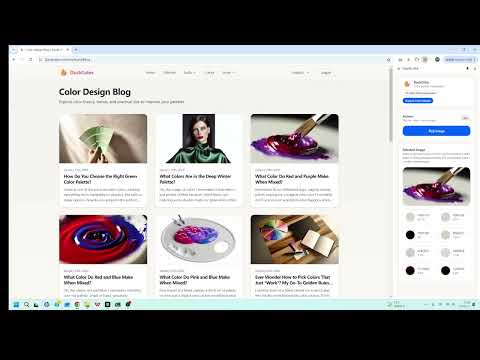
Overview
Pick an image and extract a color palette.
Description DuckColor is a lightweight color‑palette companion for designers and developers. Pick any image on a webpage and instantly extract a clean palette with HEX codes and approximate color percentages—shown in a convenient side panel. How to use - From the toolbar: Click the DuckColor icon → Open DuckColor → Pick image → click an <img> on the page (press Esc to cancel). - From the context menu: Right‑click an image → Analyze color palettes (the side panel opens and starts analyzing). What “Analyze” does - Extracts the dominant colors from the selected image and returns a compact palette (HEX + %). - If an image can’t be downloaded due to site restrictions, DuckColor may ask for site access (and can fall back to analyzing visible pixels when possible). Permissions & privacy - DuckColor may request optional site access only when needed to read the image you selected (per‑site, on demand). - No account required; palette extraction runs locally in your browser.
5 out of 51 rating
Details
- Version1.0.1
- UpdatedFebruary 8, 2026
- Size89.09KiB
- LanguagesEnglish
- DeveloperWebsite
Email
support@duckcolor.com - Non-traderThis developer has not identified itself as a trader. For consumers in the European Union, please note that consumer rights do not apply to contracts between you and this developer.
Privacy

This developer declares that your data is
- Not being sold to third parties, outside of the approved use cases
- Not being used or transferred for purposes that are unrelated to the item's core functionality
- Not being used or transferred to determine creditworthiness or for lending purposes
Support
For help with questions, suggestions, or problems, visit the developer's support site