

PhraseCrate – Text Expander & Snippets

Overview
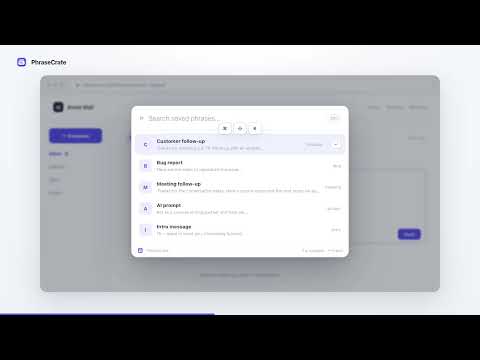
Text expander for saved replies and snippets. See phrases you use often on each site near the top when you open the launcher.
PhraseCrate is a local-first text expander for Chrome. Save reusable text snippets for email replies, canned responses, scheduling links, and other phrases you type repeatedly. Insert your saved wording with a shortcut or find it in the phrase launcher. YOUR FREQUENT PHRASES, FOR EACH SITE Open the launcher before typing a search, and phrases you use often on the current site appear near the top. The same library can have a different order on different sites. Context Rank uses the current website hostname, insertion counts, and last-used times stored in your browser. Once you type a search, PhraseCrate matches phrase names, shortcuts, and text. It does not use AI to generate your replies. TWO WAYS TO INSERT A PHRASE • Type a saved shortcut, then press Space or Enter. • Press Command/Ctrl + Shift + K to open the launcher, search, and press Enter. REVIEW FILL-IN FIELDS BEFORE INSERTING Add fields such as {{name}} or {{company}} to a phrase. Review the values and completed text before insertion. Suggestions can come from confirmed local history and possible values on the current page. You choose what to use; suggestions are not selected automatically. PhraseCrate inserts the phrase but never sends your message. LOCAL STORAGE, WITHOUT AN ACCOUNT Your phrases and site usage history stay in your browser. There is no cloud sync, shared team library, AI generation, analytics, or tracking. Back up and restore your phrases with JSON. Only values you confirm and insert are saved for future fill-field suggestions. You can forget learned suggestions individually. Page-derived suggestions are processed temporarily on your device and are not stored or sent to external APIs. FREE AND PRO Create and use up to 15 phrases for free. Pro is a $19 one-time purchase that removes the phrase limit and includes a license for up to three devices. Polar handles checkout and license verification; PhraseCrate does not receive payment card details. SUPPORTED INPUTS AND WEBSITE ACCESS PhraseCrate works with standard text fields, text areas, and common content-editable fields. Some custom editors may have limited support. Chrome internal pages and the Chrome Web Store do not allow content insertion by extensions. Website access lets PhraseCrate detect your shortcuts, open the launcher, suggest possible values when you choose a fill-in phrase, and insert the phrase you confirm. Phrase content, page content, and learning data are not sent to external APIs. Pro activation and license verification communicate with Polar. On first launch, PhraseCrate explains its local data use and starts after you choose Enable PhraseCrate.
0 out of 5No ratings
Details
- Version0.5.3
- UpdatedNovember 15, 2026
- Offered byerrrt
- Size375KiB
- LanguagesEnglish (United States)
- Developer
Email
kzmotk+dev@gmail.com - Non-traderThis developer has not identified itself as a trader. For consumers in the European Union, please note that consumer rights do not apply to contracts between you and this developer.
Privacy

PhraseCrate – Text Expander & Snippets has disclosed the following information regarding the collection and usage of your data. More detailed information can be found in the developer's privacy policy.
PhraseCrate – Text Expander & Snippets handles the following:
This developer declares that your data is
- Not being sold to third parties, outside of the approved use cases
- Not being used or transferred for purposes that are unrelated to the item's core functionality
- Not being used or transferred to determine creditworthiness or for lending purposes