

PhoneBurner Dial Session Companion
1 rating
)
Overview
Launch PhoneBurner dial sessions from CRM lists and tasks. HubSpot, Close, Apollo, Forth, Salesforce & more supported.
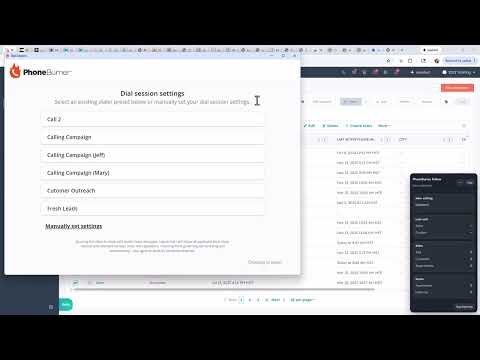
📞 PhoneBurner Dial Session Companion Making a lot of outbound calls from your CRM? Every dial is a copy-paste, a click-to-call, a wait for the connect tone, a hang-up, a note logged manually, then repeat. Best case you hit 15-20 dials an hour. It's a slog. There's a faster way. Power dialing — where a dedicated dialer works through your contact list while you focus on the conversations — turns that same hour into 60-80 dials. This Chrome extension pairs with PhoneBurner, a professional power dialer trusted by 3,000+ sales teams, to bring that speed directly into your CRM. Select the contacts you want to call — click Launch — and start dialing. Calls, dispositions, and notes log back to your CRM automatically as you go. No CSV exports. No leaving your CRM tab. Works on virtually any CRM. The extension pairs deeply with several major sales platforms — see the per-CRM sections below for the exact depth of integration on each. Beyond those, a generic list scanner covers hundreds of other CRM websites out of the box, including the niche and industry-specific ones we haven't specifically tested. 4.7 on G2, with badges for Best ROI, Easiest Setup, and Momentum Leader. The extension is free. You'll need a PhoneBurner subscription to power the dialing — start a free trial at https://phoneburner.biz/ ✅ Reach up to 4x more people per hour ✅ Automatic call logging on supported CRMs — calls and notes write back to the record, so there's no after-call data entry ✅ Follow every call live — your CRM auto-navigates to the record being dialed, so you're always looking at the right person 🚀 What You Can Do 🔹 Launch a dial session in one click Pick contacts from any list, saved segment, or task queue and start dialing instantly — no CSV exports, no imports. Works with contacts, companies, and deals. • Select records on any CRM list view and launch • Pick a saved HubSpot list and dial up to 500 contacts or companies at once • Dial straight from your HubSpot Task Queue or AgencyZoom task list — turn your to-do list into a power session 🔹 Click-to-call for one-off calls A PhoneBurner flame icon sits next to phone numbers on your records, lists, and tasks. Click it to place — and log — a single call in seconds, perfect for quick follow-ups when you don't need a full session. • Every phone field is dialable — mobile, work, home, and custom properties • On HubSpot, calling a task row auto-completes the task; on Forth, click-to-call logs the call and your note to the contact • Icon-only and out of your way — toggle it off anytime in Settings 🔹 Never lose your place The real-time Follow widget rides along on your CRM tab, showing the current call and your live session stats, and auto-navigates to whoever's being dialed — so you're always on the right record. ⚙️ Works Where You Already Work PhoneBurner offers three levels of CRM support depending on the platform. The deepest tier uses each CRM's official API for real-time bi-directional data — see the per-CRM sections below for what each integration includes. A middle tier uses optimized page reading for CRMs that don't offer accessible APIs. And a generic list scanner handles everything else, so any CRM with a checkbox-based list view has a strong chance of working. Not sure if your CRM will work? Install the extension and open your usual list view — if a Launch button appears in the popup when you select records, you're set. Generic scanning covers most Chromium-compatible CRM websites out of the box, even ones we haven't specifically tested. The essentials by CRM: 🔹 HubSpot — Launch from selected contacts, companies, or deals; from a saved list (up to 500 records); or from the Task Queue, where tasks auto-complete as you finish each call. Discovers every phone property and lets you set a preferred number. Secure OAuth, no scraping. 🔹 Close — Launch from contacts or leads. Calls log as Close activities and your call notes sync to the lead, with custom outcomes matched automatically. One-click OAuth. 🔹 Apollo.io — Launch from the People page, or straight from sequence call tasks (filter by due today, overdue, or all open), and auto-navigate to each profile as you dial. One-click OAuth. 🔹 Forth CRM — Launch from a contact list or a single record, with the cell number dialed first. Calls and notes log to the contact's Call History, attributed to the rep who made the call, and click-to-call sits on every number. Connect with an API key from your Forth admin. 🔹 Salesforce — Optimized page reading handles Salesforce list views. Select records and launch just like the API-integrated CRMs above; call logging happens inside PhoneBurner. 🔹 Pipedrive — Same optimized page-reading tier. List-view selection launches directly into a PhoneBurner session. 🔹 AgencyZoom — Same tier. Also includes launching from the AgencyZoom task list to power-dial through your to-do items. 👥 Who This Is For • SDR and BDR teams making 40+ outbound calls a day and tired of the CSV export → dialer → manual logging loop • Account executives running weekly dial days from list segments • Recruiters working candidate outreach out of HubSpot or Close • Sales ops leaders replacing copy-paste workflows with a one-click launch from their team's existing lists and task queues • Teams on niche or industry-specific CRMs where a purpose-built integration doesn't exist — the generic list scanner turns your existing CRM into a launchpad without a custom build 🔥 What Makes This Different • HubSpot Task Queue dialing via HubSpot's API — turn any task queue into a PhoneBurner session, with tasks auto-completing as you finish each call so your queue clears itself • Follow-me widget — your CRM tab auto-navigates to whoever's being dialed in real time • Click-to-call that logs the call — one click places the call AND records it on the CRM record with disposition, notes, and recording link (on supported CRMs) • Three levels of CRM support — full API integrations for the deep ones, optimized page reading for the middle tier, and generic scanning that catches virtually anything else • The extension is free — you pay for PhoneBurner. No separate license, no per-user fees on the extension. ⚙️ How It Works 1. Install the free extension 2. Start a PhoneBurner free trial at https://phoneburner.biz/ if you don't already have an account — PhoneBurner is what actually powers the dialing 3. Connect your PhoneBurner account (Personal Access Token), plus your CRM if it's one of the deeper integrations 4. Open a CRM list or record 5. Launch a dial session, or click a phone number to place a single call 6. Dial through your list while the Follow widget keeps your CRM in sync 🔐 Security & Privacy ✅ Your PhoneBurner token is stored server-side with strict owner-only permissions — your browser keeps only an anonymous lookup key, never the token itself ✅ CRM connections use industry-standard OAuth for the primary integrations, or a secure API key where OAuth isn't offered ✅ The extension only reads CRM data when you start an action — never silently in the background ✅ Nothing is sold or shared with third parties, and all traffic is encrypted over HTTPS ❓ Common Questions How does this relate to PhoneBurner? This Chrome extension is one half of a two-part system. It reads your selected contacts from your CRM and hands them off to PhoneBurner, which does the actual dialing, live call routing, and recording. You'll need a PhoneBurner subscription to use it — start a free trial at https://phoneburner.biz/ Which CRMs does this work with? See the per-CRM sections above for the exact depth of integration on each supported platform. In short: several major sales CRMs get deep API-based integrations, a middle tier of CRMs gets optimized page reading, and a generic list scanner covers everything else with a checkbox-based list view. If your CRM has selectable rows, there's a strong chance the extension works — install and try. Does it log calls back to my CRM automatically? It depends on the CRM. Close logs calls as activities on the lead, including notes and recording links. Apollo.io logs sequence-task completions. Forth records the call in the contact's Call History. HubSpot uses PhoneBurner's official HubSpot integration (available in your PhoneBurner account settings) for logging — this extension focuses on launching sessions and keeping your CRM in sync while you dial. For any other CRM, calls log inside PhoneBurner itself. Does the extension read my CRM data in the background? No. All data reading happens only when you explicitly click a button — either to launch a dial session or to place a click-to-call. No passive scraping, no background monitoring, no browsing analytics. Is this made by PhoneBurner or a third-party developer? Developed and maintained by PhoneBurner directly. Official product, not a community project. How is my PhoneBurner token stored? Server-side with strict owner-only file permissions. The browser only holds an anonymous lookup identifier — never the token itself. Every request re-authenticates through that identifier. Can I use this without connecting my CRM? Generic list scanning works on many CRM websites without connection. But the deeper features (Task Queue dialing, automatic call logging, Follow widget on supported CRMs) require connecting the specific CRM through OAuth or API key. 📌 Good To Know • The deeper integrations ask you to connect that CRM once — via OAuth for most, or an API Key ID + Secret from your admin where OAuth isn't available • Other CRMs are supported through optimized page reading when an API isn't available, or generic list scanning for anything else • Dial sessions support up to 500 contacts • Features vary slightly by CRM 🆕 What's New in v0.8.7 🎉 Forth CRM is now supported (full API integration) — connect once with your Forth API key, then launch PhoneBurner dial sessions straight from a Forth contact list or a single contact record. 📝 Calls and notes log back into Forth automatically — recorded in the contact's Call History with disposition, duration, and recording link, and any notes you type are saved on the contact. 📞 Click-to-call in Forth — a PhoneBurner button next to every phone number places (and logs) a single call in one click.
5 out of 51 rating
Details
- Version0.8.8
- UpdatedAugust 27, 2026
- Offered byjeffosness
- Size109KiB
- LanguagesEnglish (United States)
- DeveloperJeffrey Ryan Osness
325 West 670 North Circle St. George, UT 84770 USEmail
jeffosness@gmail.comPhone
+1 623-298-2771 - TraderThis developer has identified itself as a trader per the definition from the European Union and committed to only offer products or services that comply with EU laws.
Privacy

PhoneBurner Dial Session Companion has disclosed the following information regarding the collection and usage of your data. More detailed information can be found in the developer's privacy policy.
PhoneBurner Dial Session Companion handles the following:
This developer declares that your data is
- Not being sold to third parties, outside of the approved use cases
- Not being used or transferred for purposes that are unrelated to the item's core functionality
- Not being used or transferred to determine creditworthiness or for lending purposes
Support
For help with questions, suggestions, or problems, please open this page on your desktop browser