


Overview
Know when the emails you send in Gmail get opened, using an invisible tracking pixel.
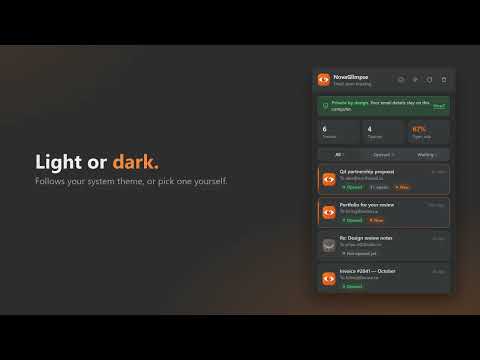
NovaGlimpse tells you when the emails you send in Gmail get opened. No accounts, no setup, no ads. Send an email from Gmail as usual. NovaGlimpse adds an invisible tracking pixel to the message and lists it in the popup as "Not opened yet." When the recipient opens it, the toolbar icon shows a count and the entry flips to "Opened 5m ago," with a re-open counter if they come back to it. HOW IT WORKS • Each email you send gets a 1×1 pixel with a random code. When the recipient's mail client loads it, the open is recorded. • The extension checks for new opens about once a minute and shows an unread count on the toolbar icon. • Click the icon to see every tracked email, its recipient, subject, send time and open status. • Refresh forces an immediate check. Clear read removes already-opened emails from the list. • When you view your own sent email in Gmail, NovaGlimpse recognizes its pixel and discounts that view so it doesn't count as an open. • Light and dark themes, following your system or set manually. PRIVATE BY DESIGN • Subjects, recipient addresses, send times and open history stay in this browser's local storage only. They are never uploaded or synced and are deleted when you uninstall. • The server stores only the random tracking code and the time each pixel loaded. • Email addresses, names, subjects, message content, IP addresses and user agents are never collected. • No accounts, no analytics, no ads. WHAT TO EXPECT Pixel tracking is a strong signal but not a read receipt. "Opened" means the pixel was fetched. • If the recipient blocks remote images, no open is recorded even if they read the email. • Gmail's image proxy may pre-fetch images, which can register an open at delivery time or hide repeat opens. • Viewing your sent email on a phone or in a browser without the extension counts as an open. Tracking pixels are subject to privacy rules such as GDPR, ePrivacy and CAN-SPAM depending on where you and your recipients are. Use NovaGlimpse responsibly. Works on mail.google.com. Requires the storage and alarms permissions and access to Gmail and the NovaGlimpse server.
0 out of 5No ratings
Details
- Version1.0.0
- UpdatedOctober 29, 2026
- Size48.74KiB
- LanguagesEnglish (United States)
- DeveloperNovawave LLCWebsite
522 West Riverside Avenue Spokane, WA 99201 USEmail
ceo@novawave.llcPhone
+1 509-903-5770 - TraderThis developer has identified itself as a trader per the definition from the European Union and committed to only offer products or services that comply with EU laws.
- D-U-N-S139083636
Privacy

NovaGlimpse has disclosed the following information regarding the collection and usage of your data. More detailed information can be found in the developer's privacy policy.
NovaGlimpse handles the following:
This developer declares that your data is
- Not being sold to third parties, outside of the approved use cases
- Not being used or transferred for purposes that are unrelated to the item's core functionality
- Not being used or transferred to determine creditworthiness or for lending purposes