

Synchronize Tab Scrolling

Overview
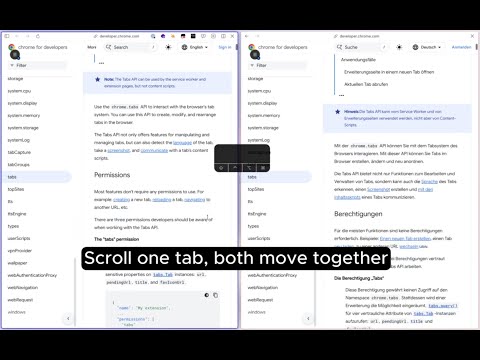
Scroll once, sync everywhere. Compare documents, code, or translations side by side with one-click sync.
--- How to Use 1. Click the extension icon. 2. Select the tabs you want to sync from the list of open tabs. 3. If you have many tabs, find them quickly by title, part of the URL, or domain. 4. Click "Start Sync", then scroll in any connected tab. --- Basic Scroll Sync When you scroll in one tab, the other connected tabs move to the same relative position based on each page's length. For example, if you move to the 40% point in one document, the other document also moves to its own 40% point. Even when page lengths differ, the tabs move together based on the overall flow, which makes long documents easier to read side by side. Even on pages with smooth scrolling enabled, synced scrolling applies the latest position immediately. --- Manual Position Adjustment When page structures differ, the same relative position may not line up with the same paragraph. A translation can be longer or shorter than the original. Staging and Production can have different banners or experimental UI. Each document can also have different tables of contents, ads, or header heights. In that case, hold Option (Mac) or Alt (Windows/Linux) and scroll only one tab. While the key is held, only the current tab moves. When you release the key, that position is saved as the new reference point, and all tabs scroll together again from there. This is useful when you want to realign the comparison position without stopping sync. --- URL Sync Turn on URL Sync to sync supported page navigation as well as scroll position. Path changes are synced, such as moving from `/products/keyboard` to `/products/mouse`. Query parameters such as search terms, filters, and sorting are also applied together. Language paths such as `/ko` and `/en` are kept per tab when possible. URL Sync provides two modes. 1. Follow changed tab Other tabs follow the changed tab's website and page flow. The path and query parameters change together, while language paths such as `/en` or `/ko` are kept on the target tab when possible. Starting state: • Tab A: https://docs.example.com/ko/guides/start?q=scroll&filter=basic • Tab B: https://docs.example.com/en/guides/start?q=scroll&filter=basic Tab A moves to another path and search condition: • Tab A: https://docs.example.com/ko/guides/url-sync?q=tab-sync&filter=advanced Result: • Tab A: https://docs.example.com/ko/guides/url-sync?q=tab-sync&filter=advanced • Tab B: https://docs.example.com/en/guides/url-sync?q=tab-sync&filter=advanced This is useful when you want to compare documents, internal search results, or filtered lists on the same site across multiple languages. 2. Keep each tab's website Each tab stays on its own website and, when possible, moves to the same path and query parameters. Language paths are also kept per tab. Starting state: • Tab A: https://www.example.com/ko/products/keyboard?q=keyboard&color=black • Tab B: https://staging.example.com/en/products/keyboard?q=keyboard&color=black Tab A moves to another product path and filter: • Tab A: https://www.example.com/ko/products/mouse?q=mouse&color=white Result: • Tab A: https://www.example.com/ko/products/mouse?q=mouse&color=white • Tab B: https://staging.example.com/en/products/mouse?q=mouse&color=white This is useful when comparing pages with similar URL structures across different sites. You can check Production and Staging, A/B variants, country-specific sites, language-specific pages, internal search results, and filtered product lists side by side. URL Sync may not apply on pages blocked by browser security policies or site restrictions. For example, some search engine result pages, login pages, PDF viewers, and web application pages are excluded from sync. --- Key Features • Manual sync for local file:// pages that the browser can render directly, including HTML, Markdown, JSON, text, CSV, and logs • Real-time scroll position sync across multiple tabs • URL Sync for supported page navigation • Modes for following the same website or keeping each tab on its own website • Sync support for paths, search terms, filters, sorting, and other query parameters • Fine-tune one tab with Option/Alt, then continue syncing from the adjusted position • Compare Staging/Production, A/B variants, original/translated text, and multilingual pages • Automatic sync suggestions when identical or related pages are detected • Support for Chrome, Firefox, Edge, Brave, and Chromium-based browsers • Works locally without data collection, analytics, tracking, or account sign-up --- Pages Where Sync Is Not Available Due to browser security policies or site restrictions, this extension cannot be used on the following pages. • Google services: Docs, Drive, Gmail, Sheets, Slides • Web applications such as Figma, JIRA, Notion, and Microsoft Office Online • Browser internal pages: chrome://, edge://, about: • Extension stores and some search engine result pages • PDF files and PDF viewers • Login and authentication pages • Special URLs such as view-source:, data:, and blob: Unsupported tabs appear disabled in the selection list, and the reason is shown in a tooltip. --- Privacy • Does not collect user data • No analytics, tracking, or cookies • Works offline without network requests • No account or login required • Does not read or upload local file contents • Open source: https://github.com/jaem1n207/synchronize-tab-scrolling --- Available on Chrome, Firefox, Edge, Brave, and Chromium-based browsers. 9 languages supported: Korean, English, Japanese, French, Spanish, German, Chinese (Simplified), Chinese (Traditional), Hindi.
4.3 out of 515 ratings
Details
- Version2.15.0
- UpdatedAugust 15, 2026
- Size532KiB
- Languages9 languages
- DeveloperWebsite
Email
tech.jmtt@gmail.com - Non-traderThis developer has not identified itself as a trader. For consumers in the European Union, please note that consumer rights do not apply to contracts between you and this developer.
Privacy

This developer declares that your data is
- Not being sold to third parties, outside of the approved use cases
- Not being used or transferred for purposes that are unrelated to the item's core functionality
- Not being used or transferred to determine creditworthiness or for lending purposes
Support
For help with questions, suggestions, or problems, visit the developer's support site