

Responsive Tester - Multi-Screen Simulator

Overview
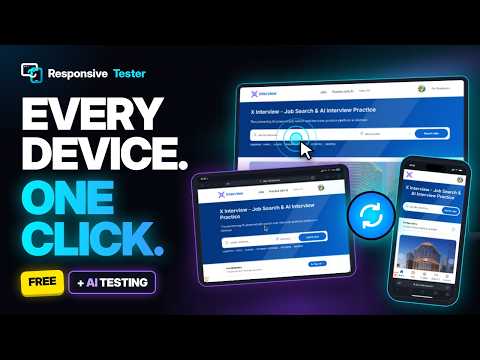
Test responsive websites on multiple mobile, tablet & desktop screens. Real-time sync for scroll, click & form inputs.
Responsive Tester is a browser extension that helps frontend developers, designers, and QA teams test responsive websites from a single workspace. Instead of repeatedly resizing the browser window or switching between different devices, you can open multiple screen sizes side by side and compare how a website behaves across different layouts. Key Features 📱 Multi-Screen Responsive Testing Test multiple viewport sizes at the same time in a synchronized workspace. Open mobile, tablet, laptop, and desktop layouts side by side, or create your own custom screen dimensions. You can synchronize common interactions between screens, including scrolling, clicking, and form input. This makes it easier to check navigation, forms, responsive layouts, and breakpoint behavior. The extension also supports custom User-Agent settings, allowing you to test websites that change their behavior based on the browser or device User-Agent. 📸 Screenshots and Area Capture Capture complete web pages or select a specific area of the interface. Full-page capture can be useful for reviewing long pages, while area capture makes it easy to share a specific UI issue with your team. Screenshots can be stored locally and accessed from the extension's media gallery. 🎨 Screenshot Annotation Add visual notes directly to captured screenshots. Use arrows, rectangles, highlights, text, and other simple annotations to point out layout problems or areas that need attention. This is useful when reporting issues such as incorrect spacing, overlapping elements, broken alignment, or responsive layout problems. 🎥 Tab Recording Record browser sessions as WebM videos to demonstrate responsive behavior, reproduce UI issues, or share a testing session with your team. Recorded media is processed locally in the browser. The extension also includes basic video compression to help reduce the size of recordings before sharing them. 🔍 Element Inspection Inspect elements directly inside the testing environment and review useful information about the page structure and responsive behavior. This can help developers investigate layout issues without constantly switching between the website and browser developer tools. 🕶️ Isolated Testing Use isolated browser sessions when you need to test experiences such as logged-out pages, fresh sessions, or pages that depend on browser storage and cookies. This can be useful when checking how a website behaves for a new or returning visitor. 🤖 Optional MCP Integration Responsive Tester can also work with compatible AI tools through the Model Context Protocol (MCP). With the optional MCP integration, supported AI clients can interact with the extension to perform responsive testing tasks, such as opening a page, checking different screen sizes, interacting with forms, and reviewing the results. This feature is intended for developers who want to combine responsive testing with their existing AI-assisted development workflow. 🔒 Local-First and Privacy Testing and media processing are performed locally in your browser. The extension does not upload tested websites, page content, screenshots, recordings, form values, or test results to an external server. If analytics is enabled, anonymous feature-usage events may be sent to Google Analytics. These events are designed to measure extension usage and do not include the content of your testing sessions. Broad website access is required because the extension needs to open and test websites selected by the user. - Built for Modern Web Development Responsive Tester is designed to make responsive testing easier without requiring developers to constantly resize browser windows or switch between multiple tabs. Whether you are checking a new layout, investigating a responsive bug, preparing a visual report, or experimenting with automated testing, the extension provides the tools in one browser-based workspace. All core testing features work directly in the browser, keeping your development workflow simple and your testing data local.
4.8 out of 520 ratings
Details
- Version3.0.5
- UpdatedOctober 20, 2026
- Size80.81MiB
- Languages4 languages
- DeveloperNGUYỄN XUÂN THÔNGWebsite
Thôn Đồng Sống Thạch Xá, Thạch Thất, Hà Nội Ha Noi, Hà Nội 100000 VNEmail
thong.nguyenn56@gmail.com - TraderThis developer has identified itself as a trader per the definition from the European Union and committed to only offer products or services that comply with EU laws.
Privacy

This developer declares that your data is
- Not being sold to third parties, outside of the approved use cases
- Not being used or transferred for purposes that are unrelated to the item's core functionality
- Not being used or transferred to determine creditworthiness or for lending purposes
Support
For help with questions, suggestions, or problems, visit the developer's support site