

Pesticide - Advanced CSS Debugger

Overview
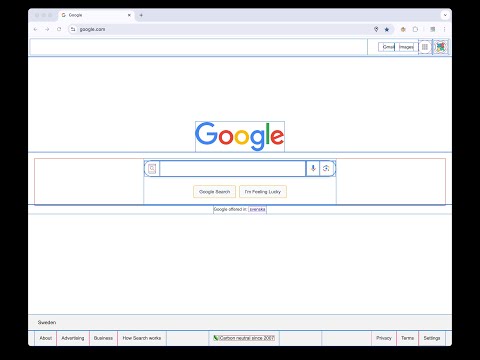
Not only inserts outlines (without background color) on all elements, but also inspects size and layout. CSS is awesome!
Pesticide 3.2 is an advanced CSS debugger for Chrome that helps you inspect layout, spacing, typography, and computed styles directly on the page. Turn it on and hover any element to open a floating inspector with the details you actually need: - Element tag, id, and classes - DOM path - Client / offset / scroll dimensions - Full box model: margin, border, padding, radius, and content size - Font inspection - Computed CSS properties - Copy CSS output in Tailwind, inline, or block format What makes Pesticide useful: - Outline-based debugging without shifting layout - Click to pin the current element while comparing spacing and styles - Resizable, draggable inspector overlay - Per-site saved panel position and size - Options page to show or hide inspector sections - Quick keyboard control with Ctrl + Shift + P Pesticide is built for front-end developers, designers, and anyone debugging tricky CSS. It gives you a fast visual way to understand how a page is built without opening heavyweight tools for every small layout check. Version 3.2 highlights: - Better floating inspector workflow - Copy CSS panel with Tailwind, inline, and block output - Font and computed-style inspection - Configurable inspector sections from the options page If you want a lightweight Chrome extension for faster CSS debugging, Pesticide is built for that job.
4.9 out of 5100 ratings
Details
- Version3.2.0
- UpdatedMarch 26, 2026
- Size169KiB
- Languages51 languages
- Developer
- Non-traderThis developer has not identified itself as a trader. For consumers in the European Union, please note that consumer rights do not apply to contracts between you and this developer.
Privacy

Pesticide - Advanced CSS Debugger has disclosed the following information regarding the collection and usage of your data. More detailed information can be found in the developer's privacy policy.
Pesticide - Advanced CSS Debugger handles the following:
This developer declares that your data is
- Not being sold to third parties, outside of the approved use cases
- Not being used or transferred for purposes that are unrelated to the item's core functionality
- Not being used or transferred to determine creditworthiness or for lending purposes
Support
For help with questions, suggestions, or problems, please open this page on your desktop browser