


Overview
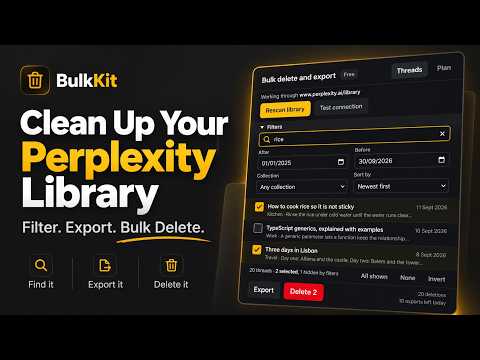
Bulk delete Perplexity threads. Filter by keyword or date, export to Markdown or JSON first. Nothing leaves your browser.
Perplexity keeps every search you have ever run. There is no bulk delete, no trash, and no way to clear out hundreds of old threads except one menu at a time. BulkKit reads your library, lets you narrow it down, and clears it out in one pass. SELECT WHAT YOU WANT Filter by keyword, by date range, or by collection. Sort by title, date or collection. Selection survives filter changes, so you can narrow by one term, select, widen, narrow by another, and your earlier picks are still there. When some of your selection is hidden by the current filter, the panel says so, and the confirmation counts it. SAVE BEFORE YOU DELETE Export selected threads as Markdown, one file per thread in a zip, or as a single JSON file. Questions and answers are both included. The delete dialog has an export-first checkbox that is on by default. If the export fails, nothing is deleted. DELETE WITH THE BRAKES ON Every deletion goes through a confirmation that states the exact count. There is a dry run that walks the whole plan and deletes nothing. Cancel works mid-run. When a run stops because your session ended or Perplexity rate limited the account, you get a plain explanation and a summary of what was already done. Threads that failed stay in the list with their outcome shown. YOUR DATA STAYS WITH YOU BulkKit works inside your own logged-in session on a perplexity.ai tab you already have open. It holds no Perplexity password, cookie or token, and it can only do what you could do by clicking around the site yourself. Thread titles, thread contents and your exports never leave the browser. FREE AND PRO Free covers 20 deletions and 10 thread exports a day. Pro removes both limits and the card at the bottom of the panel, for a single payment of $4.99. There is no subscription and no account, and one key covers 3 devices. WHAT IT DOES NOT DO It does not post, search, rename or change anything on your behalf. Deleting is the only thing it writes to Perplexity, and only after you confirm it. Not affiliated with, endorsed by, or sponsored by Perplexity AI.
0 out of 5No ratings
Details
- Version1.0.1
- UpdatedSeptember 15, 2026
- Size154KiB
- LanguagesEnglish (United Kingdom)
- DeveloperWebsite
Email
cagri@dijitalguru.com - Non-traderThis developer has not identified itself as a trader. For consumers in the European Union, please note that consumer rights do not apply to contracts between you and this developer.
Privacy

This developer declares that your data is
- Not being sold to third parties, outside of the approved use cases
- Not being used or transferred for purposes that are unrelated to the item's core functionality
- Not being used or transferred to determine creditworthiness or for lending purposes
Support
For help with questions, suggestions, or problems, visit the developer's support site