


Overview
Follow a click through every redirect and see whether its click IDs and UTMs survived. Nothing leaves the browser.
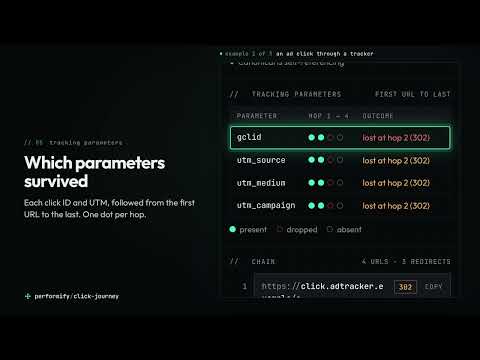
Click Journey follows a click through every redirect and tells you what happened to its tracking on the way. Open it on any page and it shows the chain the browser took to get there: each URL, its status code, how long the hop took and what changed between one URL and the next. Above the chain is a one-line verdict, for example "3 redirects, all 4 tracking parameters lost at hop 2", and a short list of what to fix. WHAT IT CHECKS - The redirect chain. Server redirects (301, 302, 303, 307, 308), meta refresh, JavaScript redirects and forms that submit themselves, each with its timing. Temporary redirects, long chains, loops, redirects from https to http and chains that end on an error are flagged. - Tracking parameters. Whether click IDs (gclid, gbraid, wbraid, dclid, msclkid, fbclid, ttclid, li_fat_id and others) and UTM parameters reach the final URL, and which hop dropped, renamed or altered them. - Tags on the landing page. Which requests went out to known advertising and analytics tag endpoints, and whether they carried the click ID. - Attribution cookies. Whether the click ID reached the cookie a platform reads it from, or whether that cookie still holds an earlier click. - The final page. Canonical, robots directives and HSTS. - What Chrome did on its own. When the browser upgraded a link to HTTPS or replayed a redirect from its cache, the server was never asked. Click Journey says so, so that you do not report a redirect that was not tested. WHO IT IS FOR People who buy or measure clicks: paid media and performance marketers, analytics and tagging specialists, technical SEOs, and the developers who are sent the ticket when attribution goes missing. HOW TO USE IT 1. Open the page you want to test, or click the ad or link that leads to it. A chain is recorded as the page loads, so reload any tab that was already open when you installed the extension. 2. Click the Click Journey icon in the toolbar. Read the verdict and the findings, then the chain below them. 3. Press Copy to put the report on the clipboard, or PDF to save it, and send it to whoever has to fix the redirect. Press Panel to keep the view open in Chrome's side panel while you click through a journey. If the URL has no click ID on it, "Re-run with test click IDs" loads the first URL again with labelled test values added, so the chain can be tested without a real ad click. WHAT IT READS, AND WHERE THAT GOES To record a chain on whatever site you are testing, the extension needs access to all sites. Chrome words that permission as "Read and change all your data on all websites". The extension does not change page content. This is what it reads: - For each page you load in a tab: the URLs requested, their status codes, response headers, timing and server IP address. Cookie values in response headers are discarded; only cookie names and attributes are kept. - One request header, Sec-Fetch-User, kept as a single true or false: whether a person started the navigation. - From the page itself: its canonical, robots and meta refresh tags, and the time of your first click or key press on it (the time only, not what you clicked or typed). This is how a redirect is told apart from a link you followed. - The addresses of requests to a fixed list of advertising and analytics tag endpoints. - When you open the view: the cookies for the landing page, from which only a fixed list of attribution cookie names is kept. The rest are discarded at once. All of this stays in the browser. It is held in memory, in Chrome's session storage for the extension, and is cleared when the tab closes, when the extension is reloaded or updated, and when the browser closes. The extension makes no network request of its own. There is no account, no analytics, no server and no third party. The only ways anything leaves are the ones you choose: Copy puts the report on your clipboard and PDF opens Chrome's print dialog. Two buttons act on your tab, and only when you press them: "Re-run" loads the first URL of the chain again, and "Clear these and re-run" deletes the attribution cookies listed on screen for that site and then loads it again. KNOWN LIMITS - A tab that was open before the extension was installed or reloaded has nothing to show until you reload it. - Chrome often upgrades an http:// link to https:// before any request is sent. The site's own http to https redirect is then not visible to any extension. Click Journey reports that it was not tested. - A page answered by the site's own service worker, or restored from the back/forward cache, produces no request to record. The view says so. - Delayed JavaScript redirects are inferred from timing and from whether you touched the page, not reported by Chrome. An inferred hop is labelled. - Tags are read from request addresses only. A tag that sends its data in the request body is listed, and what it carried is not read. - Sites are grouped by domain using a short built-in list of public suffixes, so an unusual suffix can be grouped wrongly. - It does not work on Chrome's own pages or on the Chrome Web Store, where Chrome does not let extensions run. - English only. Built for and tested on Chrome for desktop. SUPPORT Questions and bug reports: hello@performify.co.uk Click Journey is made by Performify, a UK performance marketing consultancy. https://performify.co.uk/
0 out of 5No ratings
Details
- Version1.0.1
- UpdatedOctober 10, 2026
- Size236KiB
- LanguagesEnglish (United Kingdom)
- DeveloperPerformify LimitedWebsite
2 Cliftonwood Crescent Cliftonwood Crescent Bristol BS8 4TU GBEmail
hello@performify.co.ukPhone
+44 7917 180384 - TraderThis developer has identified itself as a trader per the definition from the European Union and committed to only offer products or services that comply with EU laws.
- D-U-N-S225077016
Privacy

Performify Click Journey: Redirect & Click ID Checker has disclosed the following information regarding the collection and usage of your data. More detailed information can be found in the developer's privacy policy.
Performify Click Journey: Redirect & Click ID Checker handles the following:
This developer declares that your data is
- Not being sold to third parties, outside of the approved use cases
- Not being used or transferred for purposes that are unrelated to the item's core functionality
- Not being used or transferred to determine creditworthiness or for lending purposes