


Overview
Your new tab, perfected. History, Quick Links and Bookmarks on the left, plus 40+ AI chats on the right. Switch instantly.
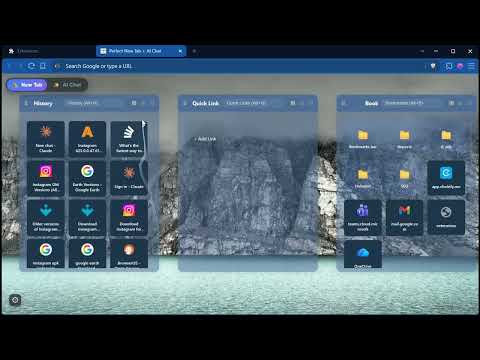
Your new tab, perfected. Perfect New Tab + AI Chat replaces Chrome's default new tab page with two views: 1) A fast, private productivity dashboard on the left - your browsing history, bookmarks and quick links in one place. 2) The top AI services you already use on the right. Switch between them instantly with the left and right arrow keys. NEW TAB DASHBOARD: HISTORY, BOOKMARKS AND QUICK LINKS Three organized columns put your browsing life at your fingertips: History: your open tabs and recently visited sites with automatic favicons. Click an open tab to jump straight to it, and a tab you close keeps its place in the list instead of disappearing. The list updates itself as you open and close tabs, and scrolls back through several screens of history. Quick Links: customizable shortcuts you can add, edit, and reorder. Bookmarks: a full bookmark manager with folder navigation. SEARCH EVERY COLUMN Per block search: filter any column instantly with Alt+H for history, Alt+Q for quick links, and Alt+B for bookmarks. Grid, list, and details views for every block, so you can see your content the way you want. Beautiful background images that persist across sessions and only change when you click New Image. AI CHAT HUB: OVER 40 AI TOOLS IN ONE TAB Over 40 AI services in one place, grouped so you can reach the right one without hunting through tabs: Chat assistants for writing, reasoning, and everyday questions. Image and video generators. Audio, voice, and music tools. Search, research, and translation tools. Coding assistants and browser based editors. Each service opens inside your own existing logged in session. No extra accounts, no API keys. Filter, favorite, search, pin, and full screen any service. PERFORMANCE Ultra fast loading. Site icons come from the ones Chrome already has, and backgrounds are cached locally, so rows draw immediately without a network lookup. The dashboard works offline after first use. PRIVACY FIRST: NO DATA COLLECTION Zero data collection. Everything stays on your device. No tracking, no analytics, no external servers, no accounts. Local storage is used only to save your preferences and caches. Recently closed tabs are remembered on your device only, and clearing your browsing history clears them too. When you use an embedded AI service, you connect to that provider directly under their own privacy policy, exactly as if you visited their website. The extension never reads, logs, or stores your conversations. WHY CHOOSE PERFECT NEW TAB + AI CHAT Instant organization with no setup required. Highly customizable layout, columns, and transparency. Optimized for speed. Clean, distraction free design. Privacy by design. A free new tab replacement that doubles as your browser start page: a history and bookmark dashboard when you need to get somewhere, an AI chat hub when you need to get something done.
5 out of 51 rating
Details
- Version1.3.3
- UpdatedAugust 17, 2026
- Size1.46MiB
- Languages19 languages
- DeveloperWebsite
Email
support@mybusinessbrain.ai - Non-traderThis developer has not identified itself as a trader. For consumers in the European Union, please note that consumer rights do not apply to contracts between you and this developer.
Privacy

This developer declares that your data is
- Not being sold to third parties, outside of the approved use cases
- Not being used or transferred for purposes that are unrelated to the item's core functionality
- Not being used or transferred to determine creditworthiness or for lending purposes
Support
For help with questions, suggestions, or problems, please open this page on your desktop browser