

Penny: Job Application Autofill by Your Apply Desk

Overview
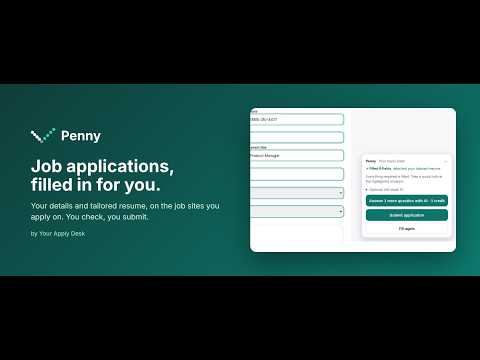
Fills job applications with your details and the resume you tailored for the role. You check every answer, then submit.
Penny fills job applications for you, with your own details and the resume you tailored for that role on Your Apply Desk. Open an application on any employer's site and click Fill this page (or press Alt+Shift+F). Penny fills your name, contact details, LinkedIn, location and current role, attaches your tailored resume and cover letter, and answers the standard questions you've already answered before, such as work authorization, sponsorship, veteran and disability status. You stay in control: Only empty fields are filled; nothing you typed is changed. Anything Penny can't answer is highlighted and listed, with a Go button to jump to it. Nothing is submitted until you press Submit yourself. Answers you give once, Penny remembers. When you submit an application, Penny remembers what you chose for the standing questions (equal-opportunity questions, veteran and disability status, visa and work-authorization status) and fills them next time. Those answers stay only in your browser, are never sent to us, and you can see and forget them from the Penny icon. Optional AI answers: for open questions on roles you tailored, Penny can draft answers from your own confirmed experience (1 credit per application on Your Apply Desk). Written answers are flagged for you to read and make your own. Works on job application forms across the most widely used applicant tracking systems, so you can fill out applications faster wherever employers post them. Penny needs a free Your Apply Desk account (yourapplydesk.com), where you upload your resume once, confirm your facts and tailor a resume for each role.
0 out of 5No ratings
Details
- Version1.9.0
- UpdatedOctober 30, 2026
- Offered byAMS Technology Solutions
- Size33.07KiB
- LanguagesEnglish (United States)
- DeveloperAditya Arora
21 Goldenrod Drive Montgomery, NJ 08502 USEmail
aditya@amstech.aiPhone
+1 551-254-9002 - TraderThis developer has identified itself as a trader per the definition from the European Union and committed to only offer products or services that comply with EU laws.
Privacy

Penny: Job Application Autofill by Your Apply Desk has disclosed the following information regarding the collection and usage of your data. More detailed information can be found in the developer's privacy policy.
Penny: Job Application Autofill by Your Apply Desk handles the following:
This developer declares that your data is
- Not being sold to third parties, outside of the approved use cases
- Not being used or transferred for purposes that are unrelated to the item's core functionality
- Not being used or transferred to determine creditworthiness or for lending purposes
Support
For help with questions, suggestions, or problems, visit the developer's support site