

PegShot - Custom Shape Screenshots, Text Extraction, Redaction & PDF Export

Overview
Capture custom-shape screenshots, extract text, redact sensitive data, copy to clipboard, and export webpage selections as PDF.
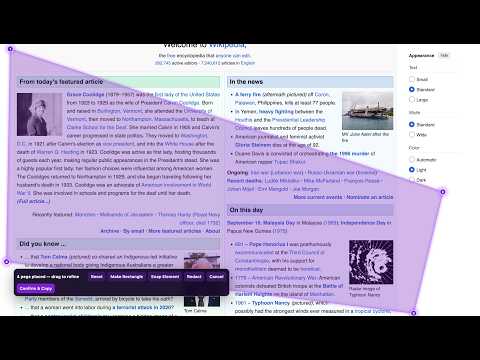
PegShot lets you capture exactly what you need from any webpage—an irregular area, a full scrolling page, a single element, selected text, or a polished PDF. Instead of being limited to a rigid rectangular screenshot, place four movable pegs around the content you want. Refine the shape, turn it into a perfect rectangle when needed, snap to a page element, redact sensitive details, then copy or export the result. Stop dragging your mouse or trackpad through a long webpage just to select text. Open Extract Text, place four pegs around the section you need, and copy the extracted text instantly for use in notes, documents, chats, or AI tools. Tired of taking multiple screenshots, cropping them, and stitching them together? PegShot captures the exact webpage area you choose—even when it spans a long, scrolling page—then lets you copy it as a PNG or download it directly. Key features • Flexible four-peg area capture for custom-shaped webpage selections • Rectangle mode for clean, precise rectangular captures • Smart Element Snap for images, cards, tables, and other page elements • Full Page Capture for a complete long-page screenshot • Extract Text from a selected webpage area without manual text dragging • Permanent redaction: draw black boxes over private text or details before capture • Copy PNG captures directly to the clipboard • Export selected content as PDF for reports, records, and sharing • Press Alt + Shift + P to start a capture quickly PegShot is useful for research, bug reports, design feedback, documentation, receipts, tables, visual references, and clean team updates. Your webpage captures, redactions, PDF exports, and extracted text are processed in your browser and are not uploaded to the developer. If you choose to sign in, PegShot uses your Google-authenticated account only to manage your trial or license entitlement; it does not send your webpage content to the entitlement service. Try every feature free for 7 days. Continue with a one-time $2.99 Gumroad license.
5 out of 56 ratings
Details
- Version1.0.3
- UpdatedSeptember 21, 2026
- FeaturesOffers in-app purchases
- Size5.31MiB
- LanguagesEnglish (United States)
- DeveloperWebsite
Email
pegshot.support247@gmail.com - Non-traderThis developer has not identified itself as a trader. For consumers in the European Union, please note that consumer rights do not apply to contracts between you and this developer.
Privacy

PegShot - Custom Shape Screenshots, Text Extraction, Redaction & PDF Export has disclosed the following information regarding the collection and usage of your data. More detailed information can be found in the developer's privacy policy.
PegShot - Custom Shape Screenshots, Text Extraction, Redaction & PDF Export handles the following:
This developer declares that your data is
- Not being sold to third parties, outside of the approved use cases
- Not being used or transferred for purposes that are unrelated to the item's core functionality
- Not being used or transferred to determine creditworthiness or for lending purposes
Support
For help with questions, suggestions, or problems, please open this page on your desktop browser