


Overview
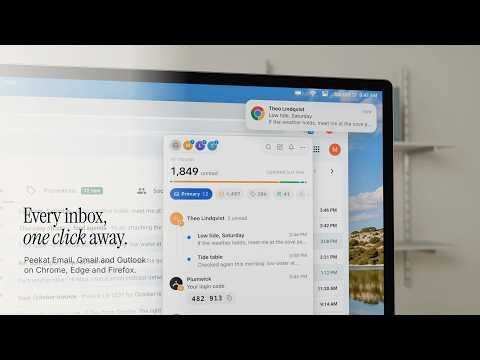
A calm Gmail notifier and checker, Outlook in beta: unread count for multiple accounts, desktop notifications and one-click codes.
Your toolbar icon counts the new mail that needs you, and new mail in your Primary inbox sends a notification. The full unread count is one setting away. Sign-in codes and links, security alerts, new mail in labels you made and senders you set to Always notify come through too; you can mute any label. Everything else in Promotions, Social, Updates and Forums waits silently in the list. Peekat Email is a Gmail notifier and Gmail checker for your browser's toolbar. It shows the unread mail of every account in one list, from the toolbar, the side panel or a full page. • Every Gmail account, no limit. Personal Gmail and Google Workspace accounts sit side by side. See multiple Gmail accounts in one list, or use the account switcher to look at one. Outlook.com, Hotmail and Live accounts join them in beta; a work or school Microsoft account may need its admin's approval first. • Quiet by default. New mail, a sign-in code or someone you chose can make a sound; everything else waits in the list, silently. Desktop notifications come only for the mail you chose to hear about. Pick one of eight notification sounds or your system's own, and set quiet hours for the night or the weekend. • Codes, one click. A sign-in code in a new message is copied with one click. Copy the verification code from the list or from its notification; on the sender's own site, Peekat fills it in too. • Handle mail where you are. Open a message, mark it read, archive it or move it to Trash. Writing and replying open Gmail's or Outlook's own compose window. • Unread count at a glance. The toolbar badge shows the mail that waits for you, or every unread message if you prefer. • Honest counts. Peekat never says "all clear" unless it really is. • Gmail notifications not working? Gmail's own notifications need a Gmail tab left open. Peekat checks your accounts from the browser itself, so new mail reaches you with no Gmail tab open. • Mends itself. Checks carry on, and a damaged cache rebuilds without losing your choices. Also: search your unread mail, keyboard shortcuts, group mail by sender, Light, Dusk and Dark themes, and an interface in ten languages. Yours, and only yours. Peekat reads your mail only from Google, or from Microsoft for an Outlook account, and keeps what it needs in your browser on your device. Nothing is sent to us or to anyone else, never used for advertising and never used to train AI models. There is no sign-up: Peekat uses the Gmail accounts already signed in to your browser, and an Outlook account signs in once in Microsoft's own window. No account with us, no tracking and no ads. Its only call to our site is a daily update check that sends its version and browser. Free, for as many accounts as you have. No paid plan. Privacy policy: https://peekat.email/privacy Support: hi@peekat.email Gmail is a trademark of Google LLC. Outlook is a trademark of the Microsoft group of companies. Peekat is not made or endorsed by Google or Microsoft.
5 out of 52 ratings
Details
- Version0.1.6
- UpdatedNovember 3, 2026
- Size1.31MiB
- Languages11 languages
- DeveloperWebsite
Email
hi@peekat.email - Non-traderThis developer has not identified itself as a trader. For consumers in the European Union, please note that consumer rights do not apply to contracts between you and this developer.
Privacy

Peekat Email: Notifier & Checker for Gmail™ has disclosed the following information regarding the collection and usage of your data. More detailed information can be found in the developer's privacy policy.
Peekat Email: Notifier & Checker for Gmail™ handles the following:
This developer declares that your data is
- Not being sold to third parties, outside of the approved use cases
- Not being used or transferred for purposes that are unrelated to the item's core functionality
- Not being used or transferred to determine creditworthiness or for lending purposes
Support
For help with questions, suggestions, or problems, visit the developer's support site