


Overview
Free 2FA authenticator: copy or fill OTP (TOTP) codes in one click, import from Google Authenticator, unlock with Windows Hello.
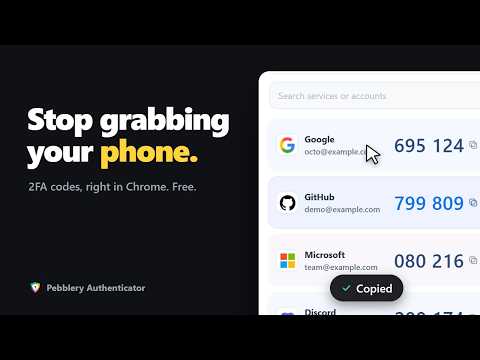
Pebblery Authenticator is a free 2FA authenticator for Chrome. It generates one-time passwords (OTP / TOTP) for two-factor authentication and keeps your accounts encrypted on your PC. Moving from Google Authenticator? Scan its export QR and all your accounts come across. Unlock with a recovery password or, on supported Windows and Chrome versions, Windows Hello. It's free, with no account and no separate connector to install. ■ Fast every day · Unlock with Windows Hello (face, fingerprint or PIN), built in with no extra app · Click anywhere on a card to copy the code · One-click fill: on a sign-in page press Ctrl+Shift+2, then Enter · Accounts for the site you're on are shown first, starting with the one you used there last · If a code is about to expire, it waits a moment and copies the new one · Service icons, search, drag to reorder, automatic light/dark ■ Easy to move in · See a setup QR code on a website? Just press + · Scan with your PC camera or pick a PNG/JPG · Import many accounts at once from Google Authenticator's "Export accounts" QR · Import supported export files from 2FAS, Aegis, Ente Auth, authenticator.cc and Bitwarden, or a list of otpauth links · 6 and 8 digits, SHA-1/256/512 · Up to 100 accounts per vault ■ Back up your accounts · Turn on automatic encrypted backup in one click (latest 5 kept) · Or save an encrypted backup file to move to a new PC · Restoring only adds accounts and never overwrites · Your recovery password can open your existing vault if Windows Hello is reset ■ Private by design · Your vault is always AES-256-GCM encrypted, with no way to turn it off · Codes are generated on your PC and work offline · The extension's pages cannot make network requests; your accounts are never sent anywhere · One-click fill is limited to supported service domains or sites you explicitly link ■ Free Every feature in this release is free: no account, no ads, no trial timer. Pebblery Authenticator is an independent product, not affiliated with Google, Microsoft or any other authenticator app.
5 out of 52 ratings
Details
- Version2.3.5
- UpdatedNovember 19, 2026
- Size446KiB
- Languages16 languages
- DeveloperWebsite
Email
support@pebblery.com - Non-traderThis developer has not identified itself as a trader. For consumers in the European Union, please note that consumer rights do not apply to contracts between you and this developer.
Privacy

Pebblery Authenticator - 2FA & OTP Codes has disclosed the following information regarding the collection and usage of your data. More detailed information can be found in the developer's privacy policy.
Pebblery Authenticator - 2FA & OTP Codes handles the following:
This developer declares that your data is
- Not being sold to third parties, outside of the approved use cases
- Not being used or transferred for purposes that are unrelated to the item's core functionality
- Not being used or transferred to determine creditworthiness or for lending purposes
Support
For help with questions, suggestions, or problems, visit the developer's support site