
![Слика логотипа ставке за: Peacock TV Speeder: adjust playback speed [QVI]](https://lh3.googleusercontent.com/GVBnwnZh6Q7ndOTE3yWn6l6RD4Ew4WfbtI21kf7tZSrjj8OUCwEByx3-RJNKV-18sCF6pSBLmukh_PegfkQkSJRR3g=s60)
Peacock TV Speeder: adjust playback speed [QVI]
10 оцена
)![2. медијска ставка (снимак екрана) за Peacock TV Speeder: adjust playback speed [QVI]](data:image/gif;base64,R0lGODlhAQABAIAAAP///////yH5BAEKAAEALAAAAAABAAEAAAICTAEAOw==)
Преглед
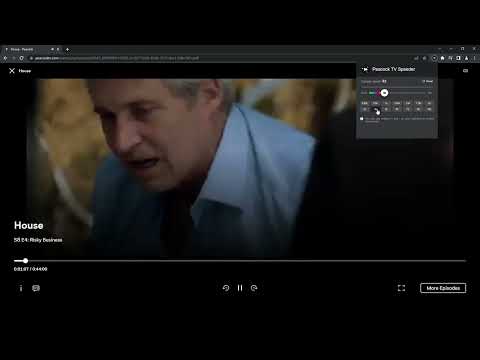
Extension allows to adjust the playback speed on Peacock TV according to preference
Get your skates on and be in control of the playback speed on Peacock TV. This extension will allow you to either speed up or slow down shows and movies to enjoy watching your favorite content at your own pace. Didn't catch that fast-talking dialogue? Want to experience your favorite scenes in slow-motion? Or maybe you'd like to fast forward the less interesting part to enjoy the series finale? You're in the right place! Here's the solution for changing the video speed. All you need to do is to add the extension to your browser and run the control panel which enables you to choose from 0.25x up to 16x speed rates. You can also use hotkeys on your keyboard to control it. It is as simple as that! How to find Speeder's control panel: 1. After installation, click the small puzzle piece icon next to your Chrome profile avatar (top right corner of the browser window) 2. You'll see all your installed and enabled extensions. 3. You can pin Speeder to have it always on top in your browser. 4. Click the Speeder icon and try different speed settings. Disclaimer : Peacock TV is a trademark of NBCUniversal Television and Streaming. This website & extension hold no association or affiliation with Peacock TV or any third-party companies. This extension is part of the Quality Viewership Initiative, a collaborative effort to enhance the understanding of audience engagement. It collects anonymous, aggregated viewing insights to support creators and studios in improving the quality of their content. You can stop sharing your information at any time by switching the toggle on the options page.
4,1 од 510 оцена
Детаљи
- Верзија1.3.29
- Ажурирано17. фебруар 2026.
- Нудиdogooodapp
- Величина89.36KiB
- Језици8 језика
- ПрограмерHideApp
1021 East Lincolnway Cheyenne, WY 82001 USИмејл
dogooodapp@gmail.comТелефон
+1 802-284-5301 - ТрговацОвај програмер се идентификовао као трговац према дефиницији Европске уније и обавезао да ће нудити само производе или услуге које су у складу са законима ЕУ.
- D-U-N-S132615120
Приватност

Peacock TV Speeder: adjust playback speed [QVI] је открио следеће информације у вези са прикупљањем и коришћењем ваших података. Детаљније информације можете да пронађете у програмеровом документу privacy policy.
Peacock TV Speeder: adjust playback speed [QVI] поступа са следећим:
Овај програмер изјављује да се ваши подаци
- не продају трећим странама, осим у оквиру одобрених случајева коришћења
- не користе и не преносе у сврхе које нису повезане са основном функцијом ставке
- не користе и не преносе ради утврђивања кредитне способности или давања зајма
Подршка
Ако вам треба помоћ у вези са питањима, предлозима или проблемима, отворите ову страницу у прегледачу за рачунаре