
![Peacock TV Skipper: skip ads, intros & more [QVI] պրոդուկտի լոգոյի պատկեր](https://lh3.googleusercontent.com/4JXn2JRemyEBIKSt28gtY_Ort1RwqDjkfz3GsmT2EShhMqCLVBTMjsdNSFvyYP0OKqfUJhc9U8pjf4HH8pPp9CEx_A=s60)
Peacock TV Skipper: skip ads, intros & more [QVI]
86 գնահատական
)![Մուլտիմեդիա օբյեկտ 2 (սքրինշոթ)՝ Peacock TV Skipper: skip ads, intros & more [QVI] պրոդուկտի համար](data:image/gif;base64,R0lGODlhAQABAIAAAP///////yH5BAEKAAEALAAAAAABAAEAAAICTAEAOw==)
Համատեսք
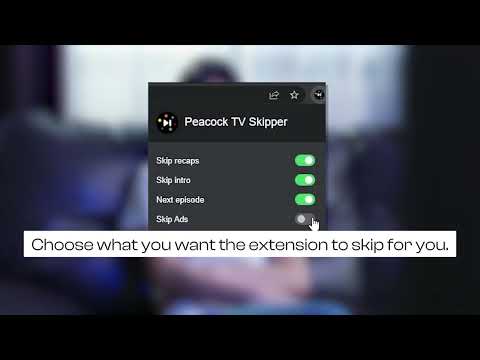
Automatically skip intros, recaps, block ads and click next episode button on Peacock TV
Extension to skip ads, intros and recaps when watching PeacockTV series. Save your time, muscles and keyboard buttons! One click to play all series episodes in a row without a single move from the couch. Add Peacock TV Skipper to your browser to automatically: - Skip ads - Skip all intros and recaps - Go to the next episode One extension to play all episodes of your favorite series in a row smoothly. All you need to do is to add the extension to your browser, switch on skipping options using toggles and log into your PeacockTV account. You are ready to binge series all night. It is as simple as that! No unnecessary clicking when watching PeacockTV series anymore! How does it work? Skipper automatically clicks "skip" buttons which appear while watching. Please note that this extension was developed and tested for the English version only. It may not work for other languages or if the "skip" button is not available by default. Disclaimer : Peacock TV is a trademark of NBCUniversal Television and Streaming. This website & extension hold no association or affiliation with Peacock TV or any third-party companies. This extension is part of the Quality Viewership Initiative, a collaborative effort to enhance the understanding of audience engagement. It collects anonymous, aggregated viewing insights to support creators and studios in improving the quality of their content. You can stop sharing your information at any time by switching the toggle on the options page.
4,3/586 գնահատական
Մանրամասներ
- Տարբերակ1.1.36
- Թարմացված է17 փետրվարի, 2026 թ.
- Մշակող՝dogooodapp
- Չափս75.24KiB
- ԼեզուներEnglish
- ԾրագրավորողHideApp
1021 East Lincolnway Cheyenne, WY 82001 USԷլփոստի հասցե
dogooodapp@gmail.comՀեռախոս
+1 802-284-5301 - ՎաճառողԱյս ծրագրավորողը հայտարարել է, որ հանդիսանում է վաճառող՝ համաձայն ԵՄ հատկորոշման, և պարտավորվել է առաջարկել միայն ԵՄ կանոնակարգերին համապատասխանող ապրանքներ և ծառայություններ։
- DUNS համարը՝132615120
Գաղտնիություն

Peacock TV Skipper: skip ads, intros & more [QVI] պրոդուկտի հրատարակիչը հետևյալ տեղեկություններն է տրամադրել ձեր տվյալների հավաքման և օգտագործման մասին։ Մանրամասները կգտնեք ծրագրավորողի «privacy policy» փաստաթղթում։
«Peacock TV Skipper: skip ads, intros & more [QVI]» պրոդուկտում մշակվում են հետևյալ տեսակի տվյալներ՝
Այս ծրագրավորողը պնդում է, որ ձեր տվյալները՝
- Օգտատերերի տվյալները չեն վաճառվում երրորդ կողմերի՝ բացառությամբ թույլատրված դեպքերի
- Չի օգտագործվում կամ փոխանցվում պրոդուկտի հիմնական գործառույթների հետ կապ չունեցող նպատակներով
- Չի օգտագործվում կամ փոխանցվում վարկունակությունը որոշելու կամ վարկավորման նպատակով
Աջակցում
Հարցերի, առաջարկների և խնդիրների հետ կապված օգնության համար բացեք այս էջը ձեր համակարգչային դիտարկիչում