
![Peacock TV Picture In Picture [QVI] üçün element loqosunun şəkli](https://lh3.googleusercontent.com/jOPxxrM5lSFKeI9hUY03KzMPR0ZaQOk6RnI6kwtS6bQzeTfqugJIsYHDTpRXp6QhM6cD1nl7vgf-ZwOEBUDlgvdzKw=s60)
Peacock TV Picture In Picture [QVI]
9 reytinq
)![Peacock TV Picture In Picture [QVI] üçün element mediası 3 (skrinşot)](data:image/gif;base64,R0lGODlhAQABAIAAAP///////yH5BAEKAAEALAAAAAABAAEAAAICTAEAOw==)
İcmal
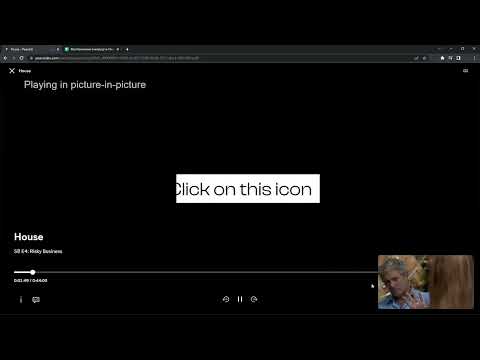
Extension to watch PeacockTV in Picture in Picture mode. Enables a separate floating window to enjoy your favorite video content.
We're thrilled to present the latest update, where we've listened to your feedback and made it happen – introducing the much-anticipated Picture-in-Picture icon with subtitles support! 🌟 What's New: New Picture-in-Picture Icon: Now you can enjoy uninterrupted viewing while diving into other tasks, all with the added bonus of subtitles! Are you looking for a tool to watch PeacockTV in a convenient always-on-top window? You’re in the right place! Focus on other tasks while watching your favorite series. Peacock TV Picture in Picture is perfect for multitasking, having something on in the background, or even working from home (we don’t advise sharing it with your boss though). There’s no need to stack multiple browser tabs anymore or to use other screens, it’s all fixed by this extension. How does it work? Peacock TV Picture in Picture allows you to play video content in a floating window pinned always on top, so you can use the rest of your screen for other tasks. This extension adds an extra control button, which can be found among other viewing options (e.g. full-screen). Just click on it to launch a separate window with the show you’d like to watch and place it wherever you want, whether you're browsing your FB feed or preparing a business presentation. All you need to do is add Peacock TV Picture in Picture extension to your browser and enjoy your favorite series in the background. It's as simple as that! Disclaimer: Peacock TV is a trademark of NBCUniversal Television and Streaming. This website & extension hold no association or affiliation with Peacock TV or any third-party companies. This extension is part of the Quality Viewership Initiative, a collaborative effort to enhance the understanding of audience engagement. It collects anonymous, aggregated viewing insights to support creators and studios in improving the quality of their content. You can stop sharing your information at any time by switching the toggle on the options page.
5/59 reytinq
Detallar
- Versiya1.0.30
- Güncəlləndi17 fevral 2026
- Təklif edənTheBestChromeExtensions
- Ölçü78.71KiB
- DillərEnglish
- TərtibatçıHideApp LLC
1021 East Lincolnway Cheyenne, WY 82001 USE-poçt
disneypictureinpicture@gmail.comTelefon
+1 802-284-5301 - Kommersiya məqsədli biznesBu tərtibatçı Avropa İttifaqının tərifinə əsasən özünü kommersiya məqsədli biznes kimi təqdim edib və yalnız Aİ qanunlarına uyğun məhsul və ya xidmətlər təklif etməyi öhdəsinə götürür.
- D-U-N-S132615120
Məxfilik

Peacock TV Picture In Picture [QVI] datanın toplanması və istifadəsi ilə bağlı aşağıdakı məlumatları açıqladı. Ətraflı məlumatı tərtibatçının privacy policy bölməsində tapa bilərsiniz.
Peacock TV Picture In Picture [QVI] aşağıdakıları idarə edir:
Bu tərtibatçı data ilə bağlı aşağıdakıları elan edir:
- Təsdiqlənmiş istifadə halları xaricində üçüncü tərəflərə satılmır
- Elementin əsas funksionallığı ilə əlaqəli olmayan məqsədlərlə istifadə olunmur və ya ötürülmür
- Kredit güvənliyini müəyyən etmək və ya kredit vermək üçün istifadə olunmur və ya ötürülmür
Dəstək
Suallar, təkliflər və ya problemlərlə bağlı yardım üçün masaüstü brauzerinizdə bu səhifəni açın