

Recorder Studio Pro: Screen/Cam/Audio & More
1 rating
)
Overview
All-in-one Screen, Window, Tab & Meeting Recorder Studio with 48kHz Audio, Webcam Facecam PiP, Multi-Cut Trimmer & AI Notes.
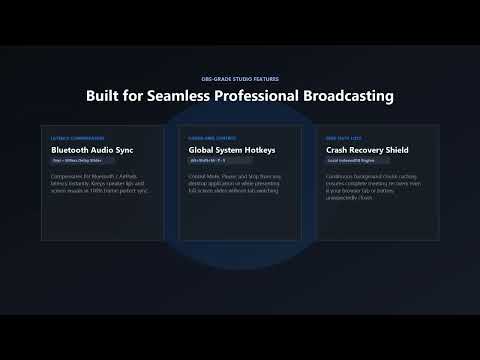
An all-in-one Screen Recorder and Google Meet Recorder featuring a Webcam PiP Recorder, high-fidelity Audio Recorder WAV export, and clean output with No Watermark. Record Google Meet calls with studio-grade sound quality, crystal-clear tab audio, and zero lost data. Meet Screen & Audio Recorder Pro turns your browser into a complete recording studio designed specifically for Google Meet conferences, lectures, presentations, and interviews. KEY FEATURES: • Studio-Grade Voice Processing: Enhances your microphone sound with real-time vocal leveling, gentle background rumble filtering, and vocal clarity tuning so your voice sounds crisp and balanced against other attendees. • Full Internal Meeting Sound: Captures meeting audio and video directly while allowing you to keep listening comfortably through your speakers or headphones. • Screen, Window & Tab Capture: Record either your active Google Meet tab directly or capture your entire screen, application windows, or other browser tabs for slides and multi-window presentations. • Interactive Floating Studio Window: Keep full control of your recording with real-time audio volume meters, elapsed timer, pause/resume controls, and quick mute buttons. • Live Audio Volume Mix: Fine-tune the balance between your microphone and meeting attendees with smooth dual volume sliders (0% to 200%). • Fail-Safe Crash Recovery: Records video chunks locally in real-time. If your browser or meeting tab closes accidentally, you can recover your recording directly from the popup. • Automatic Meeting File Naming: Automatically identifies the Google Meet session code and timestamps your recordings so your files stay organized. • Multiple Video Encodings: Choose between H.264, VP8, and VP9 encoding profiles to optimize between crisp presentation text or smaller file sizes. • Optional Live Streaming: Forward live audio and video to YouTube Live with your custom stream key. HOW TO USE: Join your Google Meet conference in Chrome. Click the Meet Screen & Audio Recorder Pro extension icon in your toolbar. Select your microphone and preferred video quality profile. Click "Start Recording" to launch the studio window and begin capturing. Use the studio window to pause, mute channels, or monitor audio levels during the meeting. Click "Stop & Save" when finished to download the recording file directly to your computer. PRIVACY FIRST: All video and audio processing runs 100% locally inside your browser. No meeting recordings, personal data, or browsing history are ever collected, transmitted to external servers, or sold. SUPPORT & FEEDBACK: For feature requests, bug reports, and updates, visit: https://github.com/Elroi-thecreator/Meet_recorder_chrome_extension/issues
5 out of 51 rating
Details
- Version2.2.0
- UpdatedOctober 18, 2026
- Offered byElroi
- Size113KiB
- LanguagesEnglish (United Kingdom)
- Developer
Email
predeepsarc1@gmail.com - Non-traderThis developer has not identified itself as a trader. For consumers in the European Union, please note that consumer rights do not apply to contracts between you and this developer.
Privacy

This developer declares that your data is
- Not being sold to third parties, outside of the approved use cases
- Not being used or transferred for purposes that are unrelated to the item's core functionality
- Not being used or transferred to determine creditworthiness or for lending purposes
Support
For help with questions, suggestions, or problems, please open this page on your desktop browser