Item logo image for PDFlow – Engineering PDF Scale, Measure & Markup

PDFlow – Engineering PDF Scale, Measure & Markup

5.0(

3 ratings

)
Item media 5 (screenshot) for PDFlow – Engineering PDF Scale, Measure & Markup
Item video thumbnail
Item media 2 (screenshot) for PDFlow – Engineering PDF Scale, Measure & Markup
Item media 3 (screenshot) for PDFlow – Engineering PDF Scale, Measure & Markup
Item media 4 (screenshot) for PDFlow – Engineering PDF Scale, Measure & Markup
Item media 5 (screenshot) for PDFlow – Engineering PDF Scale, Measure & Markup

Overview

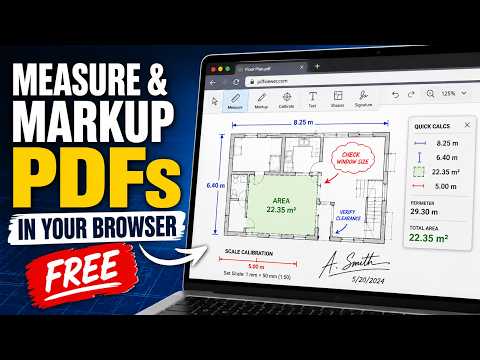
Scale, measure, mark up and calculate on engineering PDFs with built-in tools. Everything stays local.

Tired of switching between separate tools to scale drawings, measure PDFs, add markups and run simple calculations? PDFlow brings them together in one browser-based workspace. Built for engineers, architects, developers, planners, construction professionals, and anyone who regularly works with technical PDFs, PDFlow combines calibrated scaling, distance and area measurement, annotations, signatures, markup tools and built-in engineering calculators. Most PDF editors can annotate documents, but they are not designed around technical drawing workflows. PDFlow helps you calibrate plans, measure directly from drawings, complete quick calculations and export your marked-up PDF without leaving the browser. Your documents stay local. PDFlow does not upload your PDFs to an external processing server.

Details

  • Version
    1.6.4
  • Updated
    August 18, 2026
  • Offered by
    ashainp
  • Size
    2.29MiB
  • Languages
    English
  • Developer
    Ashain Perera
    Bathurst St Hobart, TAS 7000 AU
    Email
    ashainperera95@gmail.com
  • Non-trader
    This developer has not identified itself as a trader. For consumers in the European Union, please note that consumer rights do not apply to contracts between you and this developer.

Privacy

Manage extensions and learn how they're being used in your organization

PDFlow – Engineering PDF Scale, Measure & Markup has disclosed the following information regarding the collection and usage of your data. More detailed information can be found in the developer's privacy policy.

PDFlow – Engineering PDF Scale, Measure & Markup handles the following:

Website content

This developer declares that your data is

  • Not being sold to third parties, outside of the approved use cases
  • Not being used or transferred for purposes that are unrelated to the item's core functionality
  • Not being used or transferred to determine creditworthiness or for lending purposes

Support

For help with questions, suggestions, or problems, visit the developer's support site

Related

Drawboard PDF: Annotate, merge, split, convert

4.6

Powerful PDF tools for every job. Mark up, edit and collaborate on PDFs. Fill, sign, convert and measure seamlessly in your browser.

AlwaysPDF Tools

0.0

브라우저에서 바로 PDF를 편집하세요. 병합, 분할, 압축, 변환, 서명 등 모든 PDF 작업을 로컬에서 처리합니다.

Verify PDF

5.0

Локальные PDF-инструменты: сжатие, объединение, страницы, подпись, текст и конвертация — без загрузки документов.

DXF Drawing Markup

0.0

Preview local DXF files, inspect dimensions, add notes, and export an order sheet PDF locally in Chrome.

PDF Wizardry Toolkit

4.8

Transform PDFs like magic: Merge, Convert, Append, Download - all in one tool!

PDF Sidebar Studio

0.0

Complete PDF toolkit with split, merge, reorganize, and compress. Available on every page.

LocalPDF — Free Offline PDF Toolkit

0.0

All-in-one offline PDF toolkit: merge, split, compress, convert, edit, sign & protect PDFs. 100% local — no uploads.

Plot Extractor

0.0

Digitize plots, graphs, and charts from PDFs and images. Runs 100% locally — no upload.

Online PDF Converter - Private PDF Toolkit

0.0

Private PDF tools for converting, compressing, organizing, editing, signing, and OCR—processed locally in your browser.

PDF Toolkit Pro

0.0

Complete PDF toolkit: convert, merge, edit, split, compress, annotate, sign, and more - all in your browser

PDF Master Pro

5.0

Complete PDF toolkit - Merge, Split, Compress, Convert & more. All locally processed for maximum privacy.

PDFill Free Editor - Free PDF Tools

5.0

16 free PDF tools without watermarks: merge, split, sign, stamp, encrypt, convert images and fill forms. Process files locally.

Drawboard PDF: Annotate, merge, split, convert

4.6

Powerful PDF tools for every job. Mark up, edit and collaborate on PDFs. Fill, sign, convert and measure seamlessly in your browser.

AlwaysPDF Tools

0.0

브라우저에서 바로 PDF를 편집하세요. 병합, 분할, 압축, 변환, 서명 등 모든 PDF 작업을 로컬에서 처리합니다.

Verify PDF

5.0

Локальные PDF-инструменты: сжатие, объединение, страницы, подпись, текст и конвертация — без загрузки документов.

DXF Drawing Markup

0.0

Preview local DXF files, inspect dimensions, add notes, and export an order sheet PDF locally in Chrome.

PDF Wizardry Toolkit

4.8

Transform PDFs like magic: Merge, Convert, Append, Download - all in one tool!

PDF Sidebar Studio

0.0

Complete PDF toolkit with split, merge, reorganize, and compress. Available on every page.

LocalPDF — Free Offline PDF Toolkit

0.0

All-in-one offline PDF toolkit: merge, split, compress, convert, edit, sign & protect PDFs. 100% local — no uploads.

Plot Extractor

0.0

Digitize plots, graphs, and charts from PDFs and images. Runs 100% locally — no upload.

Search
Clear search
Close search
Google apps
Main menu