

PDF & Screenshot to Excel by SnipSheet

Overview
PDF, image and screenshot to Excel or Google Sheets. Drag a box around any table and get real numbers, not text.
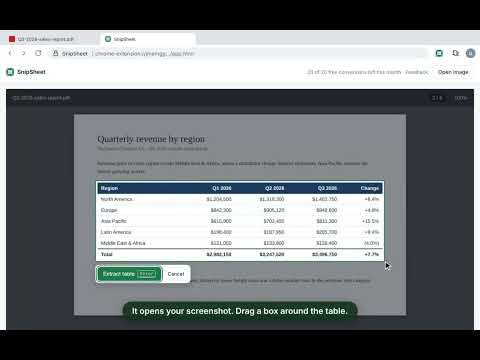
Turn tables in PDFs, scans, images and web pages into Excel or Google Sheets in one click. A simple PDF to Excel, image to Excel and screenshot to Excel converter that gives you real numbers, not text. Drag a box around any table and get a clean spreadsheet. No retyping, no messy copy-paste, no columns crammed into one cell. HOW IT WORKS 1. Click the SnipSheet button (or press Alt+Shift+S) on any page or PDF open in Chrome. Or open a PDF straight in SnipSheet. 2. Drag a box around the table 3. Download Excel, copy it to Google Sheets (paste with Ctrl+V), copy it, or save as CSV New to SnipSheet? The welcome page has a sample table you can try in seconds, without using any of your free tables. GREAT FOR • Bank and credit card statements • Financial reports and invoices • Tables in research papers and government reports • Dashboards and web pages where copy-paste fails WHY SNIPSHEET • Real numbers, not text. Sum, sort and chart right away. Currencies, percentages and dates are recognised. • Works with international formats: 1,234.56 and 1.234,56, kr., €, $, (negative) amounts and more. • Check before you export: hard-to-read cells are highlighted, and you can fix any cell with a click. • Long tables: click "Add more rows" and select the next part, even on the next page of a PDF. Repeated headers and rows are skipped. • Works on scanned PDFs, and on screenshots from any program: just paste them in with Ctrl+V. • Works on Mac, where Excel can't import PDFs. • Private: nothing is captured until you click, PDFs are opened on your own computer, and images are never stored. FREE PLAN 20 tables per month for free. Questions or feedback: snipsheet.help@gmail.com
0 out of 5No ratings
Details
- Version0.1.3
- UpdatedOctober 30, 2026
- Offered bySnipsheet
- Size2.34MiB
- LanguagesEnglish
- DeveloperGustaf Rho Frederiksen
Banevolden 44 København 2500 DKEmail
snipsheet.help@gmail.comPhone
+45 22 59 04 63 - TraderThis developer has identified itself as a trader per the definition from the European Union and committed to only offer products or services that comply with EU laws.
Privacy

PDF & Screenshot to Excel by SnipSheet has disclosed the following information regarding the collection and usage of your data. More detailed information can be found in the developer's privacy policy.
PDF & Screenshot to Excel by SnipSheet handles the following:
This developer declares that your data is
- Not being sold to third parties, outside of the approved use cases
- Not being used or transferred for purposes that are unrelated to the item's core functionality
- Not being used or transferred to determine creditworthiness or for lending purposes
Support
For help with questions, suggestions, or problems, please open this page on your desktop browser