

Overview
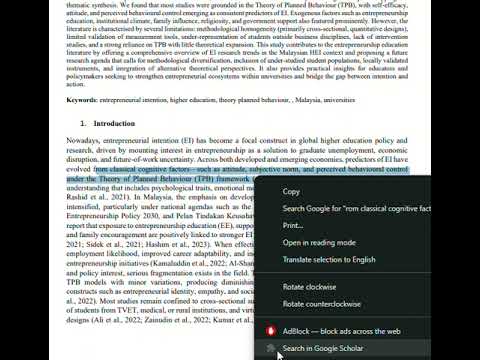
Right-click to search selected text in Google Scholar.
PDF Scholar Helper makes research faster and smoother with smart right-click tools built for students, researchers, and writers. ✨ Key Features Right-click to Search in Google Scholar Highlight any text inside a PDF, right-click, and instantly search Google Scholar — no copy-paste needed. Cite Smarter (Coming Soon) Automatically detect and underline citations already listed in your reference section. Save References to Google Scholar Library (Coming Soon) Highlight a reference → right-click → save to your Google Scholar Library. 🎯 Perfect For University students Researchers & academics Writers preparing literature reviews Anyone working with academic PDFs 💡 Why You’ll Love It Stop switching tabs. Save time. Keep your research flow uninterrupted.
0 out of 5No ratings
Details
- Version1.0
- UpdatedJanuary 3, 2026
- Size8.82KiB
- LanguagesEnglish
- DeveloperWebsite
Email
faizazizanxyz@gmail.com - Non-traderThis developer has not identified itself as a trader. For consumers in the European Union, please note that consumer rights do not apply to contracts between you and this developer.
Privacy

PDF Scholar Helper has disclosed the following information regarding the collection and usage of your data. More detailed information can be found in the developer's privacy policy.
PDF Scholar Helper handles the following:
This developer declares that your data is
- Not being sold to third parties, outside of the approved use cases
- Not being used or transferred for purposes that are unrelated to the item's core functionality
- Not being used or transferred to determine creditworthiness or for lending purposes