

PDF QuickView
8 ratings
)
Overview
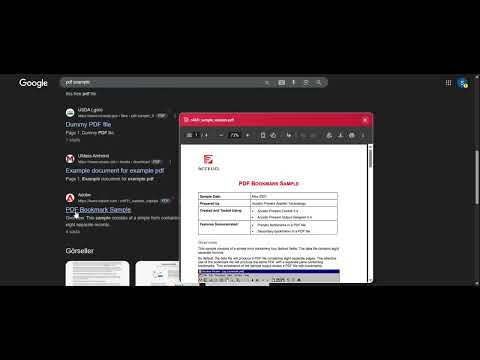
Preview PDF files on web pages without opening new tabs.
PDF QuickView: Quick PDF Preview No more opening new tabs just to view PDF files while browsing the web. PDF QuickView automatically detects PDF links on web pages and lets you quickly preview them right on the page you're on, just by hovering over the link. Key Features: • Instant Preview: Hover over PDF links to instantly view the content — no need to open a new tab. • Auto Detection: PDF links on the page are automatically detected and marked with an eye icon. • Lightweight & Fast: Only runs when you need it, without slowing down your system. • Customizable: Toggle the preview feature on/off, adjust link badges, and add custom PDF sites. How to Use? 1. Hover over a PDF link on any website. 2. The preview window will open automatically.
5 out of 58 ratings
Details
- Version1.0.0
- UpdatedMarch 18, 2026
- Offered bySamurlu Studio
- Size117KiB
- Languages24 languages
- Developer
Email
samurlu.studio@gmail.com - Non-traderThis developer has not identified itself as a trader. For consumers in the European Union, please note that consumer rights do not apply to contracts between you and this developer.
Privacy

This developer declares that your data is
- Not being sold to third parties, outside of the approved use cases
- Not being used or transferred for purposes that are unrelated to the item's core functionality
- Not being used or transferred to determine creditworthiness or for lending purposes
Support
For help with questions, suggestions, or problems, please open this page on your desktop browser