

PDF Mana: Crop, Rotate, Merge Pages

Overview
Merge, Arrange, Nip & Adjust your PDF pages — fully local, nothing uploaded.
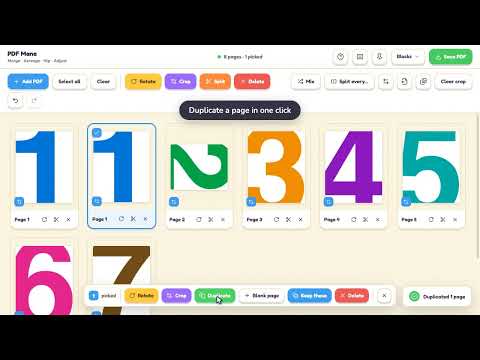
Crop, rotate, merge and combine any PDFs. You can move, rearrange, reverse, duplicate, and delete any of the pages WITHOUT ever uploading your PDFs to a server. Everything happens right in your browser 100%. PDF Mana — every page tool in one place 🔳 Crop — draw once, apply to all pages or just the ones you pick. 🔄 Rotate — one page or a whole selection. ➕ Merge — combine PDFs into one. 📄 Arrange — drag to reorder, delete, or keep just the pages you want. 🔀 Mix — interleave two PDFs page-by-page. Scan fronts, scan backs, click once for double-sided order. ✂️ Split — by your own breaks or every N pages. 🖼️ Images → PDF — drop in JPGs/PNGs, get pages. 📸 PDF → Images — export PNG/JPG up to 3×, all or a range, optional .zip. 🔢 Export ranges — e.g. 1-3, 5, 8-10. 🔍 Preview — double-click for a big view; rotate, crop, or delete right there. 💾 Autosave — your work's kept on-device, with a warning before you lose changes. ⌨️ Accessible — full keyboard control + screen-reader support. 🎨 Yours — five themes, undo/redo, shortcuts. USE CASES 📎 Stitch paperwork together — drop in every contract, receipt, and cover letter; drag them into order; save one clean PDF. 🩹 Rescue a messy scan — flip sideways pages upright, trim crooked edges and shadows, drop in a blank page where the feeder ate one. 🔀 Tame double-sided scans — fronts and backs as two stacks or one mess? Mix and Un-mix sort it into reading order, with a one-click preset for the classic flip-the-stack scan. ✅ Send only what's needed — keep just the pages that matter, or split every N pages into separate files. 🖼️ Work with images — JPG/PNG become pages the moment you drop them, and any page exports back out as an image (one each or a single .zip). 🔒 Keep it private — no upload, no account, no watermark; everything runs on your device and never leaves it. PRIVATE BY DESIGN Your files never leave your computer. PDF Mana has no servers, no accounts, no analytics, and no tracking — all PDF reading and writing happens locally in your browser. It doesn't even ask for access to any website until the moment you choose to open a PDF that's already in your tab. FREE and OPEN SOURCE PDF Mana is completely free and open source under the MIT license. Browse the code, report an issue, or contribute on GitHub: https://github.com/billye2/pdfxtn
0 out of 5No ratings
Details
- Version1.2.9
- UpdatedJuly 27, 2026
- Offered bybillye
- Size1.44MiB
- LanguagesEnglish (United States)
- Developer
Email
billye@gmail.com - Non-traderThis developer has not identified itself as a trader. For consumers in the European Union, please note that consumer rights do not apply to contracts between you and this developer.
Privacy

This developer declares that your data is
- Not being sold to third parties, outside of the approved use cases
- Not being used or transferred for purposes that are unrelated to the item's core functionality
- Not being used or transferred to determine creditworthiness or for lending purposes
Support
For help with questions, suggestions, or problems, please open this page on your desktop browser