

PDF & Image Editor Chrome Extension - Rahul Bindal
8 ratings
)
Overview
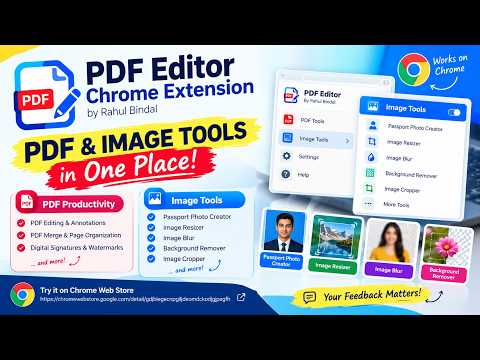
PDF tools (edit, sign, merge, OCR) and Image tools (compress, resize, crop, AI background remover, passport photos).
Edit PDFs and images in one extension. It runs entirely on your device, so your files are never uploaded. Use the PDF | Images switch at the top to move between the two tools. PDF EDITOR Edit text, add new text, highlight, underline and strike through Draw with pen, line, arrow, rectangle, ellipse and marker, and erase your drawings Add sticky notes and comments with replies, shown in Acrobat and Chrome Sign documents and fill forms Merge several PDFs, split by page range, and compress to cut file size OCR for scanned pages (works offline) Password-protect and unlock PDFs Compare two PDFs IMAGE STUDIO Compress to a target size (for example, under 200 KB) and remove EXIF/GPS metadata Resize, crop, rotate and flip, and adjust brightness and colour Blur & Hide: blur, pixelate or black out faces and private details Remove Background: – Smart (AI) cuts out people and objects, even on busy backgrounds – By colour works best for plain walls and studio backdrops – Make the background transparent, white or any colour – Touch-up brush to fix spots Passport photo maker: preset and custom sizes, background colour, and a ready-to-print sheet as PDF or image Convert between JPG, PNG and WebP, combine images into a PDF, and extract text from images (OCR) Watermark one image or a whole batch Drag and drop, paste with Ctrl+V, or right-click any web image and choose “Open image in Image Studio” PRIVATE BY DESIGN Files are processed locally in your browser The AI background model runs on your device, with no uploads and no account Everything except the optional AI assistant works offline PERMISSIONS EXPLAINED Storage: remembers your settings Context menus: adds “Open image in Image Studio” when you right-click an image Scripting and site access: lets the extension open PDFs and images you click on web pages in the editor Made by Rahul Bindal.
5 out of 58 ratings
Details
- Version1.14.3
- UpdatedOctober 30, 2026
- Offered byrbindal2811
- Size17.58MiB
- LanguagesEnglish
- Developer
Email
rbindal2811@gmail.com - Non-traderThis developer has not identified itself as a trader. For consumers in the European Union, please note that consumer rights do not apply to contracts between you and this developer.
Privacy

This developer declares that your data is
- Not being sold to third parties, outside of the approved use cases
- Not being used or transferred for purposes that are unrelated to the item's core functionality
- Not being used or transferred to determine creditworthiness or for lending purposes
Support
For help with questions, suggestions, or problems, please open this page on your desktop browser