

PDF Edna – PDF Text Editing Made Easy

Overview
PDF text editing made easy — edit the actual text of PDFs, including OCR'd scans, entirely in your browser.
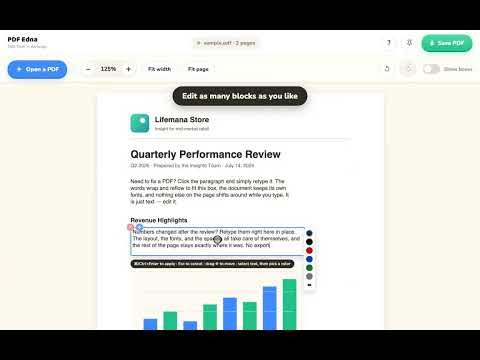
Edit the text of any PDF — fully local, nothing uploaded. Click a paragraph, retype it, done: the words reflow to fit and nothing else on the page shifts. Fix typos, update details, move text and images — WITHOUT ever uploading your PDFs to a server. Everything happens right in your browser 100%. PDF Edna — real text editing in one place ✏️ Edit — click any paragraph and just type; it reflows in the document's own fonts. 📝 Fix PDF typos — click a word and retype it. 🎨 Recolor — select text, pick a color; one word or the whole paragraph. 🧲 Move — drag paragraphs and images anywhere; spacing, kerning, and fonts are preserved exactly, with a warning before text lands on text. 📄 Fix scans — if the scan has an OCR text layer, click a word and retype it; a page-matched patch covers the old print and search stays in sync. 🗑️ Delete — remove a paragraph or an image cleanly. ↩️ Undo — step back through every edit (Ctrl+Z / ⌘Z). 💾 Safe saves — always a new copy; your original file is never touched. USE CASES ⚡ Fix the typo in an invoice, report, or flyer seconds before sending — no source file needed. 📝 Update a date, price, name, or address on a PDF someone else made. 🔍 Correct OCR mistakes so scanned paperwork finally searches right. 🖼️ Tidy a layout — nudge a heading, move a logo, rearrange sections. 🔒 Keep it private — no upload, no account, no watermark. PRIVATE BY DESIGN Your files never leave your computer. PDF Edna has no servers, no accounts, no analytics, and no tracking — all PDF reading and writing happens locally in your browser.
0 out of 5No ratings
Details
- Version1.7.1
- UpdatedJuly 27, 2026
- Offered bybillye
- Size3.03MiB
- LanguagesEnglish
- Developer
Email
billye@gmail.com - Non-traderThis developer has not identified itself as a trader. For consumers in the European Union, please note that consumer rights do not apply to contracts between you and this developer.
Privacy

This developer declares that your data is
- Not being sold to third parties, outside of the approved use cases
- Not being used or transferred for purposes that are unrelated to the item's core functionality
- Not being used or transferred to determine creditworthiness or for lending purposes
Support
For help with questions, suggestions, or problems, please open this page on your desktop browser