


סקירה כללית
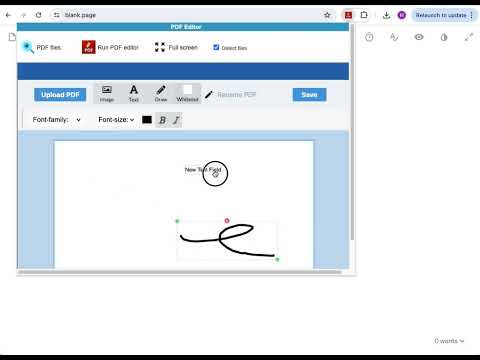
Create and edit PDF files with PDF editor online
PDF Editor online is an extension that allows to handle PDF files using directly your web browser. We provide it as a free open source system for manipulating PDF documents. It allows you to create, edit, view and annotate PDF files. It is a document editor integrated with our file manager to manage only PDF file types with this desktop app. The PDF Editor online main features are: - Creation; to create any PDF file from a basic template. - Edit; to create/modify/delete text, images and vector drawing objects like curves, lines, paths. - View; to navigate/open the PDF files. The navigation options include pages, outlines or objects. - Annotate; to create/add and save comments directly inside the file. - Compatibility with any PDF file & Acrobat Adobe. - Free software. IMPORTANT: This extension scans the URLs browsed in order to detect PDF files. The PDF files detected appear in a file list located in the extension popup that are retrieved from our servers. The scanning is performed from our servers so your URL are reported to our system. No personal data is collected. This scan can be disabled with a checkbox that appears in the extension popup. If you disable this scanning, this functionality is not available so then the extension functionality is very limited.
1.9 מתוך 5198 דירוגים
פרטים
- גרסה2.14.2
- עדכון אחרון25 באוגוסט 2024
- גודל548KiB
- שפות18 שפות
- מפתח
- לא עסקהמפַתח הזה לא ציין שהפעילות שלו נעשית במסגרת עסק. חשוב לשים לב: זכויות הצרכן לא חלות על חוזים בין צרכנים שנמצאים באיחוד האירופי לבין המפַתח הזה.
פרטיות

הפרטים הבאים נמסרו על ידי PDF editor online בנוגע לאיסוף הנתונים שלך ולשימוש בהם. מידע מפורט זמין בprivacy policy של המפתח.
PDF editor online מטפל בדברים הבאים:
המפַתח הזה מצהיר כי הנתונים שלך:
- לא יימכרו לצדדים שלישיים, למעט בתרחישים שאושרו
- לא משמשים או מועברים למטרות שאינן קשורות לפונקציונליות המרכזית של הפריט
- לא משמשים או מועברים לצורך קביעת מצב אשראי או לצורכי הלוואה
תמיכה
כדי לקבל עזרה לגבי שאלות, הצעות או בעיות, אפשר לפתוח את הדף הזה בדפדפן במחשב