

PDF CORE STUDIO — Offline PDF Toolkit

Overview
All-in-one offline PDF toolkit by Veroman. Convert, merge, split, compress, sign, organize & lock PDFs 100% privately in local RAM.
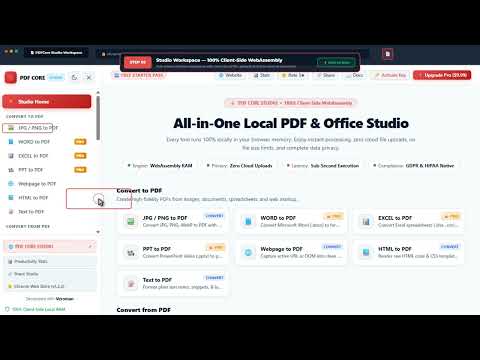
PDFCore is the ultimate 100% offline, privacy-first PDF toolkit for Chrome. Manage, convert, merge, split, compress, protect, and edit your PDF documents directly inside your browser—with ZERO server uploads or network latency. 🔒 100% PRIVATE & OFFLINE PROCESSING Unlike conventional online PDF converters that send your confidential documents to external servers, PDFCore processes all files locally on your computer using WebAssembly and client-side JavaScript. Your files never leave your machine! ⚡ CORE FEATURES & TOOLS • 🔗 Merge PDF: Combine multiple PDF documents into a single organized file with custom page re-ordering. • ✂️ Split PDF: Extract specific pages or split large PDF files into separate documents in seconds. • 🖼️ Image to PDF: Convert PNG, JPG, WebP, and BMP images into clean, formatted PDF documents. • 📝 Text & HTML to PDF: Instantly generate PDF documents from plain text files or raw web HTML code. • 🔒 Encrypt & Protect PDF: Add strong AES password protection to safeguard sensitive PDFs against unauthorized opening. • 💧 Watermark PDF: Apply custom text watermarks with adjustable position, opacity, and rotation across all pages. • 🔄 Rotate & Organize: Rotate PDF pages 90°, 180°, or 270° clockwise/counter-clockwise with real-time preview. • 🌐 Webpage to PDF: Capture active browser tabs or full webpages straight into formatted PDF files. 🌟 WHY CHOOSE PDFCORE? 1. No File Size Limits: Process large documents without file size caps or queue waiting times. 2. Complete Offline Operation: Works seamlessly without an internet connection or Wi-Fi. 3. Dark & Light Mode Support: Elegant UI designed to match your browser theme preference seamlessly. 4. Fast & Lightweight: Zero background resource consumption when not in active use. 🎯 WHO IS PDFCORE FOR? • Professionals handling sensitive financial, medical, or legal documents. • Students & Researchers organizing lecture notes and research papers. • Developers & Designers needing instant client-side conversion tools. Protect your privacy today with PDFCore—the safer, faster, offline PDF solution!
5 out of 51 rating
Details
- Version1.3.2
- UpdatedSeptember 25, 2026
- Size1.06MiB
- Languages7 languages
- Developer
- Non-traderThis developer has not identified itself as a trader. For consumers in the European Union, please note that consumer rights do not apply to contracts between you and this developer.
Privacy

This developer declares that your data is
- Not being sold to third parties, outside of the approved use cases
- Not being used or transferred for purposes that are unrelated to the item's core functionality
- Not being used or transferred to determine creditworthiness or for lending purposes
Support
For help with questions, suggestions, or problems, please open this page on your desktop browser