


Overview
Track all your Pinduoduo orders in minutes. Auto-group by batch, see daily spending, and add as many accounts as you want.
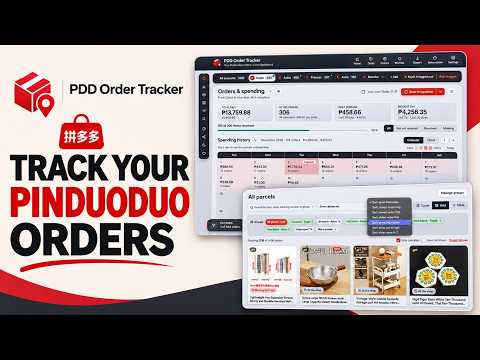
Ordering from Pinduoduo is easy. Remembering what you bought, where each parcel is, and how much you spent is the hard part. PDD Order Tracker pulls your orders and shipping updates into one clean dashboard so you can stop digging through the app. Press Scan orders while signed in to Pinduoduo. In a few minutes your orders, tracking numbers, and Chinese shipping updates are translated into English, sorted by stage, and ready to browse. TRACK EVERY PARCEL FROM SHOP TO DOOR • See where every order sits on its journey: at the shop, moving in China, JetScope warehouse, export customs, on the boat, arrived at port, clearing customs, cleared customs, out for delivery, and delivered. • Read full shipping timelines translated into English. • Spot stalled parcels that have not updated in days. • Run fast tracking-only scans to refresh parcels still in transit without rescanning old delivered orders. • Review a scan summary and full scan log showing new orders and every parcel that moved forward. ORGANIZE BY BATCH AND MARK ARRIVALS • Orders that ship together on one waybill are grouped into batches for you ("1st batch", "2nd batch"). • Create, rename, and edit your own groups by hand whenever you want. • Switch between card view and table view, search across accounts, and filter by Not yet received, Received, or Missing. • Mark items received as you unbox, or flag missing items when a box arrives short. • Pick Light, Slate, or Dark theme to match how you browse. MANAGE MULTIPLE ACCOUNTS AND SCHEDULED SCANS • Track multiple Pinduoduo accounts in one place, with automatic nickname detection and drag-to-reorder tabs. • Turn on optional Saved logins in Settings to switch accounts and scan all of them in one queue without signing in again. • Get clear alerts if Pinduoduo logs an account out so you know when to sign in again. • Set up scheduled scans to check your chosen accounts automatically on an hourly, daily, or weekly schedule while Chrome is open. KNOW WHAT YOU SPEND • View daily spending on a calendar and chart, plus totals broken down by shipping stage. • See prices in your local currency (PHP, SGD, MYR, THB, IDR, VND, and more) with the original yuan price beside it. • Catch duplicate purchases across orders, even from different shops. • Export your orders to a spreadsheet (CSV), and back up or restore your groups and received marks. SHARE YOUR HAUL OR BATCH • Generate a haul summary picture showing item and parcel counts, with optional spending totals and zero order numbers or personal details. • Turn any batch group into a shareable snapshot (one long image or swipeable 4:5 pages) with toggles to hide prices or shop names. • Copy any single item as a clean product card or mobile link to share in a chat. PRIVATE BY DESIGN • No developer server, no extension account, no analytics, and no ads. • Your orders, accounts, groups, settings, and any optional saved logins are encrypted automatically on your computer inside your Chrome profile and deleted if you uninstall the extension. • Only order and tracking text is sent to Google Translate (and MyMemory as a backup) for translation, and exchange rate lookups fetch public currency rates only when automatic rates are on. Full details are in the privacy policy. HOW TO START 1. Sign in at mobile.pinduoduo.com. 2. Click the PDD Tracker icon in your Chrome toolbar. 3. Press Scan orders and open your dashboard. SUPPORT Questions, bug reports, or suggestions: kojakeugenio@gmail.com PDD Order Tracker is free and made by one person. It is not affiliated with, endorsed by, or sponsored by Pinduoduo or PDD Holdings. "Pinduoduo" is a trademark of its owner and is used only to say which shopping site the extension works with.
0 out of 5No ratings
Details
- Version1.5.1
- UpdatedNovember 25, 2026
- Size886KiB
- LanguagesEnglish
- DeveloperWebsite
Email
kojakeugenio@gmail.com - Non-traderThis developer has not identified itself as a trader. For consumers in the European Union, please note that consumer rights do not apply to contracts between you and this developer.
Privacy

PDD Order Tracker has disclosed the following information regarding the collection and usage of your data. More detailed information can be found in the developer's privacy policy.
PDD Order Tracker handles the following:
This developer declares that your data is
- Not being sold to third parties, outside of the approved use cases
- Not being used or transferred for purposes that are unrelated to the item's core functionality
- Not being used or transferred to determine creditworthiness or for lending purposes
Support
For help with questions, suggestions, or problems, visit the developer's support site