

PBText: bold, italic, and style for LinkedIn, Facebook, YouTube, and X
2 ratings
)
Overview
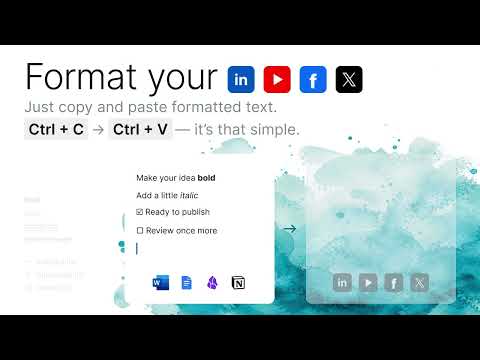
Paste preformatted posts to LinkedIn, Facebook, YouTube, or X without formatting them again.
Ever noticed that standard copy and paste does not work when moving formatted text to social media? All of the formatting is lost, and the text is pasted in without formatting. 𝐏𝐁𝐓𝐞𝐱𝐭 solves this instantly. Prepare your post in your favorite text editor, copy it, and paste it into 𝐋𝐢𝐧𝐤𝐞𝐝𝐈𝐧, 𝐘𝐨𝐮𝐓𝐮𝐛𝐞, 𝐅𝐚𝐜𝐞𝐛𝐨𝐨𝐤, or 𝐗 (Twitter). PBText automatically recognizes the regular, bold, and italic words, keeping your supported formatting perfectly intact. 𝐅𝐨𝐫𝐦𝐚𝐭 𝐭𝐞𝐱𝐭 𝐨𝐧 𝐋𝐢𝐧𝐤𝐞𝐝𝐈𝐧, 𝐅𝐚𝐜𝐞𝐛𝐨𝐨𝐤, 𝐘𝐨𝐮𝐓𝐮𝐛𝐞, 𝐚𝐧𝐝 𝐗 — 𝐏𝐁𝐓𝐞𝐱𝐭 𝐬𝐮𝐩𝐩𝐨𝐫𝐭𝐬: * 𝐁𝐨𝐥𝐝 and 𝑖𝑡𝑎𝑙𝑖𝑐 text: No more copying and pasting individual formatted words from external generators. Easily bold text in a YouTube description, Facebook post, or X post instantly. * 𝐋𝐢𝐬𝐭𝐬 𝐚𝐧𝐝 𝐡𝐞𝐚𝐝𝐞𝐫𝐬: Paste bulleted lists, numbered lists, and headings into any web form without losing your structure. * S̶t̶r̶i̶k̶e̶t̶h̶r̶o̶u̶g̶h̶, u̲n̲d̲e̲r̲l̲i̲n̲e̲, and 𝚌𝚘𝚍𝚎: Maintain advanced styling like underline, strikethrough, inline code, and full code blocks automatically. * 𝐋𝐢𝐧𝐞 𝐛𝐫𝐞𝐚𝐤𝐬 𝐚𝐧𝐝 𝐬𝐩𝐚𝐜𝐢𝐧𝐠: Prevent LinkedIn and Facebook from collapsing your post into one giant block of text. PBText keeps line breaks and intentional blank lines.Keep your line returns, paragraphs, and spaces after periods intact. * 𝐋𝐢𝐧𝐤𝐬 𝐚𝐧𝐝 𝐟𝐨𝐫𝐦𝐚𝐭𝐭𝐢𝐧𝐠: Preserve your hyperlinks and common Markdown formatting effortlessly upon pasting. *** If PBText has nothing to change — for example, if there is no formatted text or you are on another website — the standard copy-paste functionality works as usual without any changes. When PBText changes the pasted text, it adds this short credit at the end: 𝐼 𝑚𝑎𝑑𝑒 𝑡ℎ𝑒 𝑝𝑜𝑠𝑡 𝑝𝑟𝑒𝑡𝑡𝑦 𝑤𝑖𝑡ℎ 𝑃𝐵𝑇𝑒𝑥𝑡. 𝑌𝑜𝑢 𝑐𝑎𝑛 𝑑𝑜 𝑡ℎ𝑒 𝑠𝑎𝑚𝑒. You can leave the credit to help others discover how to 𝐛𝐨𝐥𝐝 𝐭𝐞𝐱𝐭 𝐨𝐧 𝐋𝐢𝐧𝐤𝐞𝐝𝐈𝐧, 𝐅𝐚𝐜𝐞𝐛𝐨𝐨𝐤, 𝐘𝐨𝐮𝐓𝐮𝐛𝐞, 𝐨𝐫 𝐗, or remove it before publishing. PBText is free. It does not require an account. 𝐏𝐫𝐢𝐯𝐚𝐜𝐲 PBText processes only the content included in a paste you initiate. Processing happens on your device. PBText does not monitor your clipboard, store pasted content, send a copy to the developer, or use pasted content for analytics or advertising. 𝐖𝐡𝐲 𝐂𝐡𝐫𝐨𝐦𝐞 𝐚𝐬𝐤𝐬 𝐟𝐨𝐫 𝐬𝐢𝐭𝐞 𝐚𝐜𝐜𝐞𝐬𝐬 PBText needs access to LinkedIn, Facebook, YouTube, and X so it can paste converted text into those websites. PBText designed to work only on LinkedIn, Facebook, YouTube, and X, and not on other websites or apps.
5 out of 52 ratings
Details
- Version1.0.0
- UpdatedJuly 26, 2026
- Size447KiB
- LanguagesEnglish
- Developer
Email
olgapavlova@gmail.com - Non-traderThis developer has not identified itself as a trader. For consumers in the European Union, please note that consumer rights do not apply to contracts between you and this developer.
Privacy

This developer declares that your data is
- Not being sold to third parties, outside of the approved use cases
- Not being used or transferred for purposes that are unrelated to the item's core functionality
- Not being used or transferred to determine creditworthiness or for lending purposes