


Overview
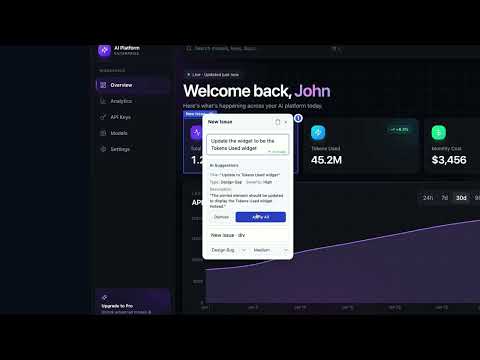
Design QA + website feedback tool. Detect UI bugs, run WCAG audits, compare Figma. Export to trackers
Design QA and website feedback tool for product teams. Detect UI bugs before they ship. OverlayQA compares live builds against Figma, runs AI design review and WCAG accessibility audits, and audits your design tokens for drift, then turns findings into dev-ready issues with screenshots, CSS selectors, and computed values. Works on staging, localhost, and production. TWO WAYS TO USE IT Chrome extension: for localhost, staging, and login-gated pages. In-app dashboard: capture and review on any public URL with no install. Great for stakeholders and clients. FEATURES Visual Comparison. Overlay Figma frames on any live page. AI diffs design vs. implementation and flags spacing, color, and layout mismatches. AI Design Review. GPT-4o detects UI issues without anyone reporting them first. Accessibility Audit. axe-core WCAG scans plus AI visual analysis catch contrast, touch-target, and ARIA issues. Design System Audit. Extract color, typography, spacing, and border tokens and flag drift. Team and Client Review. Share a link; stakeholders pin annotations and leave notes with no login. Export and Sync. One-click to Jira, Linear, Slack & more with two-way sync of status, assignee, priority, and comments. Detect UI bugs before a user bounces or a client catches them.
5 out of 51 rating
Details
- Version1.2.87
- UpdatedOctober 7, 2026
- FeaturesOffers in-app purchases
- Size1.69MiB
- LanguagesEnglish (United States)
- Developer
- Non-traderThis developer has not identified itself as a trader. For consumers in the European Union, please note that consumer rights do not apply to contracts between you and this developer.
Privacy

OverlayQA – Design QA & Website Feedback has disclosed the following information regarding the collection and usage of your data. More detailed information can be found in the developer's privacy policy.
OverlayQA – Design QA & Website Feedback handles the following:
This developer declares that your data is
- Not being sold to third parties, outside of the approved use cases
- Not being used or transferred for purposes that are unrelated to the item's core functionality
- Not being used or transferred to determine creditworthiness or for lending purposes
Support
For help with questions, suggestions, or problems, please open this page on your desktop browser