

TimeSnip - Share Availability for Google Calendar™
3 ratings
)
Overview
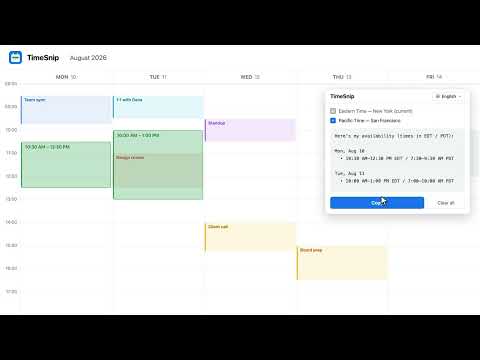
Snip time slots off your calendar and copy your availability as email-ready text, in every timezone that matters.
TimeSnip turns your free time in Google Calendar into a clean, ready-to-send availability message. HOW IT WORKS 1. Open Google Calendar in Day or Week view. 2. Click TimeSnip or press Cmd+Shift+Y / Alt+Shift+Y. 3. Drag over the times you’re free. 4. Click Copy and paste into email or chat. TimeSnip automatically formats your availability across multiple time zones and languages. TIME ZONES MADE SIMPLE • Search by city • Save default time zones • Add or remove zones per message • DST-aware, with 12- or 24-hour time 10 LANGUAGES English, French, Spanish, German, Italian, Portuguese, Russian, Bulgarian, Hebrew, and Arabic. PRIVATE BY DESIGN TimeSnip never reads your calendar events or contacts. No account, no server, no analytics. Your settings sync through Chrome. Not affiliated with Google. Google Calendar is a trademark of Google LLC.
5 out of 53 ratings
Details
- Version0.3.0
- UpdatedAugust 15, 2026
- Offered byYoni
- Size73.91KiB
- LanguagesEnglish (United States)
- Developer
Email
yoni@getbalance.com - Non-traderThis developer has not identified itself as a trader. For consumers in the European Union, please note that consumer rights do not apply to contracts between you and this developer.
Privacy

This developer declares that your data is
- Not being sold to third parties, outside of the approved use cases
- Not being used or transferred for purposes that are unrelated to the item's core functionality
- Not being used or transferred to determine creditworthiness or for lending purposes