

PawHide – Hide Website Elements
2 ratings
)
Overview
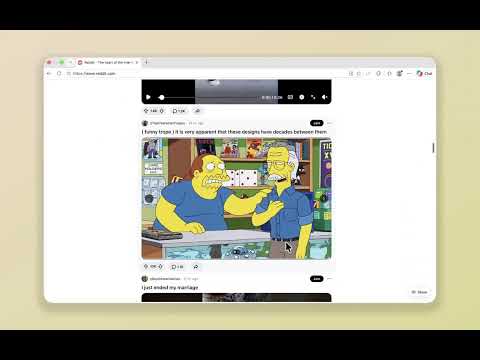
Hide distracting web elements and enjoy a cleaner, more focused browsing experience.
Want to read an article, browse your feed, or get things done with fewer distractions? Use PawHide to hide sidebars, recommendations, buttons, and other elements you don’t need. Bring them back with one click whenever you need them. Get started 1. Click the PawHide icon and choose Hide an item, or press Alt + Shift + S (Option + Shift + S on Mac). 2. Point to an item, adjust the area with W / S, then click to hide it. 3. Click Done or press Enter to finish. 4. To show or hide items, click the Show / Hide button or press Alt + Shift + H (Option + Shift + H on Mac). Best for • Reading articles without distracting sidebars or unrelated content. • Browsing feeds on social media without unnecessary features. • Using web apps without buttons and panels you rarely use. • Any website where you’d like a cleaner, more focused browsing experience. Privacy Your hiding settings and the information used to find matching items stay on your device. No data is sent to the developer or third parties. No accounts, analytics, or tracking. PawHide needs website access to select and hide items and apply your saved choices on future visits. Website changes may affect how items are found. PawHide hides content visually; it does not change the original website or block network requests.
5 out of 52 ratings
Details
- Version1.0.4
- UpdatedNovember 11, 2026
- Offered byKodin Gai
- Size4.75MiB
- Languages9 languages
- Developer
Email
kodin.gai.apps@gmail.com - Non-traderThis developer has not identified itself as a trader. For consumers in the European Union, please note that consumer rights do not apply to contracts between you and this developer.
Privacy

PawHide – Hide Website Elements has disclosed the following information regarding the collection and usage of your data. More detailed information can be found in the developer's privacy policy.
PawHide – Hide Website Elements handles the following:
This developer declares that your data is
- Not being sold to third parties, outside of the approved use cases
- Not being used or transferred for purposes that are unrelated to the item's core functionality
- Not being used or transferred to determine creditworthiness or for lending purposes