


Overview
Stops passkey prompts, Sign in with Google pop-ups, and Shop Pay and Stripe Link texting you codes. No account, nothing collected.
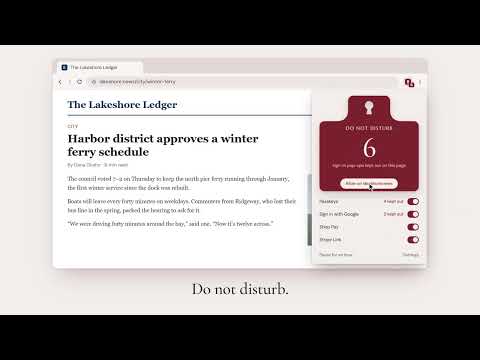
A Do Not Disturb sign for sign-in pop-ups. Websites keep asking you to use a passkey, sign in with Google, or let Shop Pay text you a code you never asked for. This extension quietly says no for you, so you can type your password and get on. What it keeps out (each has its own switch, and you can let any of them in on a site you choose): - Passkey prompts — the Windows Hello, Mac or phone QR window asking to use or create a passkey, and passkey suggestions in login fields. The site falls back to your password. A security key (a YubiKey and the like) still works, for signing in and for adding a new one. - Sign in with Google pop-ups — Chrome's "Sign in with google.com" window and One Tap on sites like LinkedIn, Pinterest, Quora and news sites. A Sign in with Google button you click yourself still works. - Shop Pay at checkout — the Shop Pay sign-in that sends verification code texts when you type your email on a Shopify checkout. Your card payment still works. - Stripe Link — "Autofill with Link" at Stripe checkouts that texts you a code. Your card fields still work. - Tabs other Chrome extensions open (off until you turn it on) — closes the welcome, "what's new" and "rate us" tabs your other extensions open on their own. The toolbar icon counts what was kept out on the page, and turns cream on sites you've allowed. Click it and the site's card says Do Not Disturb with the count; turn it over to allow pop-ups on that site, or pause everything for an hour with one click. No pop-ups, notifications or welcome tab from this extension. Ever. Privacy: free, no account, no tracking, nothing collected. Settings stay in your browser. Why "read and change all your data on all websites"? Passkey and Google sign-in prompts can appear on any site, so the extension has to run on every page to answer them with "not allowed". It doesn't read your pages, passwords or history.
0 out of 5No ratings
Details
- Version1.1.0
- UpdatedNovember 18, 2026
- Size113KiB
- LanguagesEnglish
- DeveloperWebsite
Email
hello@oakandlever.com - Non-traderThis developer has not identified itself as a trader. For consumers in the European Union, please note that consumer rights do not apply to contracts between you and this developer.
Privacy

This developer declares that your data is
- Not being sold to third parties, outside of the approved use cases
- Not being used or transferred for purposes that are unrelated to the item's core functionality
- Not being used or transferred to determine creditworthiness or for lending purposes
Support
For help with questions, suggestions, or problems, visit the developer's support site