

Extended for Paramount+: boost your viewing
8 rating
)
Ringkasan
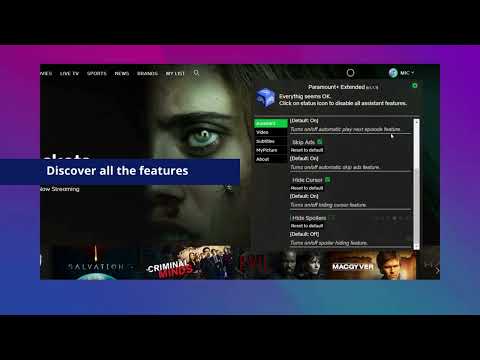
Boost your Paramount+ viewing experience: adjust speed, skip intros & recaps, hide spoilers.
With the latest update, we are introducing a new feature: keyboard shortcuts! Take full control of playback and say goodbye to mouse clicking! M – Mute F – Fullscreen ❰ / ❱ – Volume control P – Play / Pause Right / Left – Skip 10s forward / backward An extension to fast forward, skip over slow moments, and hide spoilers. Be in the driver's seat of your viewing experience! Paramount+ Extended is a great tool which unifies multiple functionalities in one easy-to-use extension and gives you more control over the Paramount+ platform. Now you're able to: - Speed up or slow down your playback speed - Skip recaps, intros, and fast forward ads for chosen titles - Hide Spoilers All you need to do is add the Paramount+ Extended extension to your browser, run the control panel, and enjoy watching content tailored to your personal viewing preferences. It's as simple as that! Disclaimer : Paramount+ is a trademark of ViacomCBS Streaming. This website & extension hold no association or affiliation with Paramount+ or any third-party companies.
3,6 dari 58 rating
Detail
- Versi1.1.20
- Diupdate10 Juni 2025
- Ditawarkan olehBestChromeExtensions
- Ukuran65.8KiB
- BahasaEnglish
- DeveloperHideApp
1021 E Lincolnway Cheyenne, WY 82001-4851 USEmail
disneypartyapp@gmail.comTelepon
+1 920-714-7945 - PedagangDeveloper ini telah mengidentifikasi diri sebagai pedagang berdasarkan definisi dari Uni Eropa dan berkomitmen untuk hanya menawarkan produk atau layanan yang mematuhi hukum Uni Eropa.
Privasi
Extended for Paramount+: boost your viewing telah mengungkapkan informasi berikut ini terkait pengumpulan dan penggunaan data Anda. Informasi lebih mendetail dapat dilihat di privacy policy developer.
Extended for Paramount+: boost your viewing menangani hal berikut:
Developer ini menyatakan bahwa data Anda
- Tidak dijual ke pihak ketiga, di luar kasus penggunaan yang disetujui
- Tidak digunakan atau ditransfer untuk tujuan yang tidak terkait dengan fungsi inti item
- Tidak digunakan atau ditransfer untuk menentukan kelayakan kredit atau untuk tujuan pinjaman
Dukungan
Untuk mendapatkan bantuan terkait pertanyaan, saran, atau masalah, buka halaman ini di browser desktop Anda