

PaperCard — Tweet & Reddit Post to Image

Overview
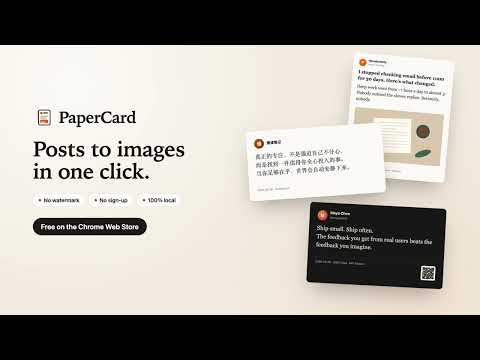
Turn social media posts, or any text you select, into clean image cards. One click, copied to your clipboard. No watermark.
Turn any post into a beautiful image — in one click. PaperCard turns the posts you read into clean, book-style image cards and copies them straight to your clipboard. Paste them into a chat, a slide deck, your notes, or a new post. No screenshots, no cropping, no editing. ★ WORKS WHERE YOU READ • On X (Twitter) and Reddit, "Share as image" sits right in each post's Share menu. A whole thread can become one card. • On other popular social sites, right-click a post and choose "Share this post as image". The full list of supported sites is shown on the Settings page after install. • On any website, select some text, right-click and choose "Create share card" to make a quote card with the site name and date. ★ DESIGNED TO BE SHARED • Four styles — Paper, Minimal, Magazine and Gradient — each in Light and Dark • Switch style or theme right from the result, no trip to Settings • Full-width photos, with multiple images stacked cleanly • Choose what goes in the footer: date and the post's engagement numbers • Optional QR code that links back to the original post • Careful typography for English, Chinese and other CJK text • Live preview in Settings shows exactly what your card will look like ★ FAST AND PRIVATE • One click and the PNG is in your clipboard, with a Download button if you'd rather save it • No watermark, no account, no sign-up • Cards are rendered locally in your browser. Nothing is uploaded, because we don't run any servers • No tracking, no analytics, no ads HOW TO USE 1. Right-click a post (or use the Share menu on X and Reddit) 2. Choose "Share as image" 3. Paste anywhere with Ctrl/Cmd + V Shortcut: select text, or hover over a post, and press Alt+Shift+S. PaperCard is an independent project and is not affiliated with any of the sites it works on.
0 out of 5No ratings
Details
- Version1.2.0
- UpdatedSeptember 29, 2026
- Offered bysuge
- Size60.92KiB
- Languages2 languages
- Developer
Email
zhichuv@gmail.com - Non-traderThis developer has not identified itself as a trader. For consumers in the European Union, please note that consumer rights do not apply to contracts between you and this developer.
Privacy

This developer declares that your data is
- Not being sold to third parties, outside of the approved use cases
- Not being used or transferred for purposes that are unrelated to the item's core functionality
- Not being used or transferred to determine creditworthiness or for lending purposes
Support
For help with questions, suggestions, or problems, please open this page on your desktop browser