


Overview
Your library of the internet. Save any URL, organize into shelves, and share what you find. Free.
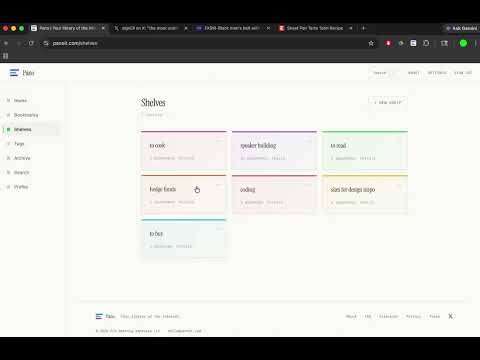
🌐 What is Pano? Pano is your library of the internet; one place to save any URL, organize it into shelves, and share what you find. Any browser, anywhere, anytime, any device, shareable with anyone. Free to use. 🔖 Key Features: Save anything → Click the extension icon or use the keyboard shortcut. We pull the title, description, and metadata instantly. One click, saved. Save all your tabs at once → Switch to "All Tabs" mode to save multiple open tabs in a single action. Select the ones you want, pick a shelf, done. Organize into shelves → Group bookmarks into color-coded shelves. 12 vivid colors to choose from. Your library, your system. Create shelves on the fly → Create a new shelf right from the extension. Name it, pick a color, and start saving. No need to leave the page. Tag and search → Add tags to any bookmark. Search across everything you've saved from the web app at panoit.com. Share with anyone → Make a shelf public or share it by link. Follow people with great taste. Build a shelf worth exploring. 💻 How to use: 1. Click "Add to Chrome" and pin it to your toolbar. 2. Sign in to your Pano account (or create one free at panoit.com). 3. Visit any page and click the Pano icon to save it. 4. Pick a shelf, hit save, keep browsing. 5. Works in Chrome, Arc, Brave, Edge, and all Chromium browsers. What you save is a portrait of how you see the world. 📪 Questions or feedback? Visit panoit.com/about or email hello@panoit.com.
0 out of 5No ratings
Details
- Version1.0.2
- UpdatedMarch 27, 2026
- Size114KiB
- LanguagesEnglish
- Developer
- Non-traderThis developer has not identified itself as a trader. For consumers in the European Union, please note that consumer rights do not apply to contracts between you and this developer.
Privacy

Pano. Save to your library has disclosed the following information regarding the collection and usage of your data. More detailed information can be found in the developer's privacy policy.
Pano. Save to your library handles the following:
This developer declares that your data is
- Not being sold to third parties, outside of the approved use cases
- Not being used or transferred for purposes that are unrelated to the item's core functionality
- Not being used or transferred to determine creditworthiness or for lending purposes