

Panescope — Responsive Design Tester & Multi-Device QA

Overview
Test responsive design on iPhone, Android, iPad and desktop at once, in sync. Accessibility audits, Web Vitals and screenshots.
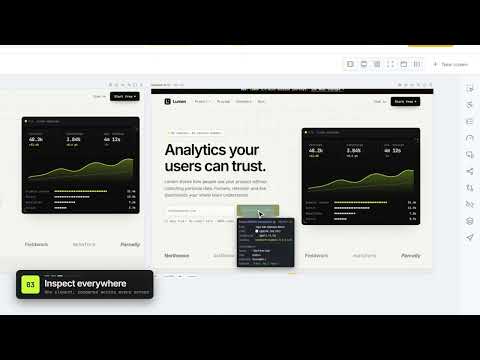
Panescope is a responsive design tester and multi-device QA workspace for Chrome. Open any website on phones, tablets, laptops and desktops side by side, at their real size and pixel ratio, all in sync. Then inspect, audit accessibility and Core Web Vitals, debug layouts, take screenshots and share reports, without leaving the browser. Built for front-end developers, web designers, QA testers and agencies. Works on any http or https page: production, staging, preview deployments and localhost. ━━━━━━━━━━━━━━━━━━━━ RESPONSIVE TESTING ON REAL SCREENS • Every screen is a live page at its exact CSS width, height and device pixel ratio, so media queries and srcset behave like on the device. • 56 devices in the library, plus your own custom sizes. • Scroll, click, hover and type in one screen and every other screen follows. • Six layouts, including a Split view that puts production next to staging. • A width slider that snaps to the real breakpoints read from the page's CSS. • Per-screen emulation: dark mode, mobile user agent, language, location, network and CPU throttling, touch and reduced motion. ━━━━━━━━━━━━━━━━━━━━ INSPECT AND DEBUG • Inspect any element on every screen at once, with its accessible name, role and contrast, and compare its size, fonts and colours across screens. • One console for all screens: errors, logs and failed requests in a single list. • Live CSS & JS, cookies and storage, request headers and basic auth for staging sites. • 42 visual debug tools: colour-blindness and vision simulations, layout outlines, stress tests for long text, and stacking contexts in 3D. ━━━━━━━━━━━━━━━━━━━━ ACCESSIBILITY AND PERFORMANCE • WCAG 2.2 audit with axe-core on every screen, with failing elements outlined on the page. • Contrast and tap-target overlays, roles and landmarks, heading outline and focus order. • LCP, INP and CLS measured in each screen, next to real-user Chrome UX Report data. • A responsive check for horizontal overflow, small tap targets and tiny text. ━━━━━━━━━━━━━━━━━━━━ SCREENSHOTS, VIDEO AND REPORTS • Full-page screenshots of one screen or all of them, up to 16× resolution, in device frames, with annotations. • Record any screen as MP4, WebM or GIF. • Photo Studio turns your live screens into launch images and videos, with templates, backgrounds, headlines and callouts. • Visual diff against a baseline, site scan, broken link checker, a shareable HTML report and ready-to-file bug reports. • Meta tags and link previews checked before you share a page. • AI agents: connect your coding agent through the panescope-mcp server to test pages on many devices. ━━━━━━━━━━━━━━━━━━━━ PRIVACY The pages you test stay in your browser. Panescope's server only handles licensing, payments and optional Chrome UX Report lookups. Some emulation and high-resolution capture features use Chrome's debugger API, so Chrome shows a "started debugging this browser" bar while they are on.
0 out of 5No ratings
Details
- Version1.0
- UpdatedOctober 15, 2026
- FeaturesOffers in-app purchases
- Offered byPanescope
- Size1003KiB
- LanguagesEnglish
- DeveloperNGUYỄN VĂN PHI
64 Nguyễn Phúc Thái, phường Kim Long Huế, Thành phố Huế 530000 VNEmail
unforcedllc@gmail.comPhone
+84 702 554 114 - TraderThis developer has identified itself as a trader per the definition from the European Union and committed to only offer products or services that comply with EU laws.
Privacy

Panescope — Responsive Design Tester & Multi-Device QA has disclosed the following information regarding the collection and usage of your data. More detailed information can be found in the developer's privacy policy.
Panescope — Responsive Design Tester & Multi-Device QA handles the following:
This developer declares that your data is
- Not being sold to third parties, outside of the approved use cases
- Not being used or transferred for purposes that are unrelated to the item's core functionality
- Not being used or transferred to determine creditworthiness or for lending purposes