


Overview
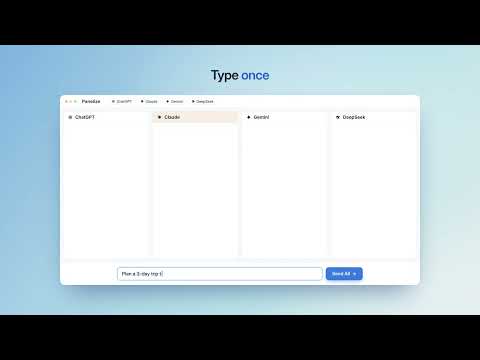
Ask multiple AI chatbots at once and compare their answers side by side. Uses your own accounts. Free, no API keys.
Panelize sends one prompt to several AI chatbots at the same time and shows every answer side by side in one window. It is free and open source, and it uses the AI accounts you are already logged into, so there are no API keys and no extra subscription. HOW IT WORKS Each panel loads the chatbot's own website with your normal login. Type once in the shared input bar and click Send All. Free accounts work, and if you pay for a plan, that panel uses your plan's models and limits. SUPPORTED SERVICES 12 popular AI chat services, plus an AI search mode. Turn on the ones you use and arrange them in any order. FEATURES • Up to 12 panels in 22 layouts, from a quick 1×2 comparison to 1×12 or 2×6 • Send All, or Fill to review the prompt in every panel before sending • New Chat for All resets every panel in one click • Upload images once and attach them to every panel • Prompt Library with variables such as {topic} • Share: turn a comparison into an image to copy or download • Resize panel columns by dragging; widths are remembered per layout • Select text on any page, right-click and choose Send to Panelize • Keyboard shortcut: Cmd/Ctrl + Shift + E PRIVACY There is no Panelize server and no analytics. Apart from the chat sites themselves, the only request is a version check against GitHub. Your conversations stay in each service's own account history. The code is MIT licensed and public on GitHub. GOOD FOR Picking the best answer, checking one model against another, writing, coding, research, translation, and trying a new model on the day it comes out. Works in Chrome and Microsoft Edge. Website: https://panelize.dev/?utm_source=chrome_web_store&utm_medium=referral&utm_campaign=store_listing Source code and issues: https://github.com/Manho/Panelize
5 out of 54 ratings
Details
- Version2.0.1
- UpdatedOctober 24, 2026
- Offered byWenhao
- Size431KiB
- Languages10 languages
- Developer
Email
homanlie1984@gmail.com - Non-traderThis developer has not identified itself as a trader. For consumers in the European Union, please note that consumer rights do not apply to contracts between you and this developer.
Privacy

Panelize - Compare AI Chatbots Side by Side has disclosed the following information regarding the collection and usage of your data. More detailed information can be found in the developer's privacy policy.
Panelize - Compare AI Chatbots Side by Side handles the following:
This developer declares that your data is
- Not being sold to third parties, outside of the approved use cases
- Not being used or transferred for purposes that are unrelated to the item's core functionality
- Not being used or transferred to determine creditworthiness or for lending purposes
Support
For help with questions, suggestions, or problems, visit the developer's support site