


Overview
Website quality check for agencies: WCAG 2.2 accessibility and on-page SEO of any page, explained for owners. Whole-site checks.
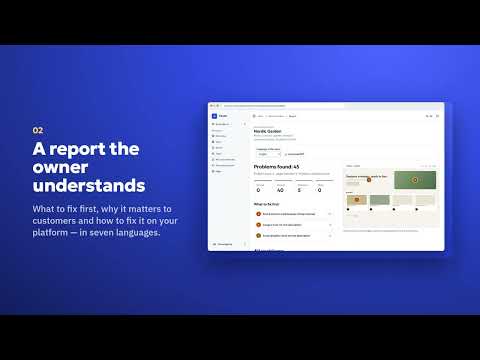
Pandus checks the page you are on for accessibility (WCAG 2.2 AA) and on-page SEO in one click, and explains every problem in plain words, so the owner of a shop or a client can read it, not only a developer. It runs in your browser, so it also checks pages behind a login: the cart, the checkout, the customer account or a staging site. WHAT YOU GET • Two scores (accessibility and SEO) with blockers and important issues listed first • Accessibility: the open axe-core engine; problems grouped by rule, WCAG 2.2 A/AA separated from advice (AAA, best practices) • Rule cards: what is wrong, why it matters for customers, how to fix it, in 7 languages • SEO tab: indexing, title and description, headings, links, images, structured data, social preview, technical basics, speed of this page load • Tools for the manual part: element inspector, tab order, headings, landmarks, alt texts, text spacing, 200% zoom, 320 px width, colour vision, contrast with an eyedropper • A hand-over checklist of 14 things automation cannot check • Copy the report as Markdown, copy a note for the developer or a ready prompt for an AI assistant • Optional free Pandus account: weekly results, saving checks of pages behind a login, whole-site check within your plan limits PRIVACY The check runs in your browser. No tracking, no analytics, no ads. Data goes to pandus.online only when you connect an account and click an action that needs it (save a check, check the whole site, see weekly results). The extension reads the active tab only when you click its icon or press Alt+Shift+A. HONEST LIMITS This is an automated check, not a full audit, and not legal advice. An automated tool finds only part of the problems; a clean result does not mean a site meets any law. The extension finds and explains problems; it does not fix your site and it is not an overlay widget. Languages: English, Ukrainian, German, Polish, Czech, Romanian, Russian. Pandus: https://pandus.online/en/accessibility-checker-browser-extension
0 out of 5No ratings
Details
- Version1.4.2
- UpdatedOctober 23, 2026
- FeaturesOffers in-app purchases
- Size633KiB
- Languages7 languages
- DeveloperВадим ЛюбивыйWebsite
Конотопський район, м. Кролевець, вул. Зелінського, буд. 107 Кролевець, Сумська область 41300 UAEmail
vadym.queensoft@gmail.comPhone
+380 96 026 1964 - TraderThis developer has identified itself as a trader per the definition from the European Union and committed to only offer products or services that comply with EU laws.
Privacy

Pandus: accessibility and SEO check has disclosed the following information regarding the collection and usage of your data. More detailed information can be found in the developer's privacy policy.
Pandus: accessibility and SEO check handles the following:
This developer declares that your data is
- Not being sold to third parties, outside of the approved use cases
- Not being used or transferred for purposes that are unrelated to the item's core functionality
- Not being used or transferred to determine creditworthiness or for lending purposes
Support
For help with questions, suggestions, or problems, please open this page on your desktop browser