


Overview
AI-powered browser flow verification for non-technical teams.
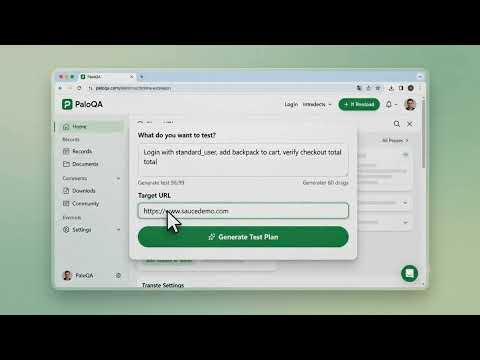
PaloQA is an enterprise-grade, AI-powered browser automation and end-to-end QA testing engine designed for developers, QA engineers, product managers, and non-technical teams. Describe test scenarios in plain natural language, record real-user journeys, perform deep API contract audits, and audit web performance — all inside your browser side-panel. Say goodbye to fragile Selenium/Playwright scripts and flaky selectors. PaloQA leverages Google Gemini AI, self-healing element locators, and Chrome DevTools Protocol (CDP) execution to guarantee 100% reliable test delivery. 🚀 WHAT'S NEW IN VERSION 0.0.10: * 🧠 AI-Powered Natural Language Test Composer (Describe any test in plain English and let AI build the plan). * 🔄 Self-Healing CDP Selectors & Dynamic Recovery (Never fail on changed IDs or Tailwind classes). * 📡 API & OpenAPI/Postman Contract Schema Drift Audit (Intercept XHR/Fetch, detect schema drift & payload diffs). * ⚡ Core Web Vitals & Visual Performance Audits (Monitor TTFB, DOM Ready, Load Time & Cache Efficiency). * 📊 One-Click Standalone HTML & Multi-Tab Excel (.xlsx) Report Exporter. * 🌓 Sleek Dark Mode & Light Mode tailored for modern QA workflows. KEY FEATURES: 1. ⚡ AI Test Composer & Intelligent Hybrid Replay * Describe your test flow in plain English (e.g., "Login with standard_user, add item to cart, verify total") and get an automated step-by-step plan. * Combines precise Chrome DevTools Protocol (CDP) cursor emulation with fallback click strategies, guaranteeing 100% click delivery on dynamic SPAs (React, Vue, Next.js). 2. 🛡️ Self-Healing Selectors & Robust Escaping * Self-healing algorithm automatically detects broken selectors and finds fallback elements on live pages. * Supports safe CSS escaping for complex Tailwind classes (with colons, brackets, slashes) and dynamic IDs without throwing console errors. 3. 📡 API Contract & Schema Drift Interceptor * Automatically captures background API calls (Fetch/XHR) during test execution. * Import Swagger/OpenAPI JSON or Postman Collections to compare live API payloads against expected schemas. * Visual Request/Response JSON viewer with instant type mismatch alerts. 4. 📊 Multi-Format Reports & Offline Export * View real-time test execution dashboards with step benchmarks, health scores, and latency metrics. * Export full test results into standalone interactive HTML reports or rich Excel (.xlsx) spreadsheets with offline embedded screenshots. 5. 🔒 Dialog Bypass & Sensitive Data Protection * Defensive bypass for cookie consent banners, popup modals, and backdrop overlays during playback. * Automatic redacting of sensitive inputs and password fields for high security. HOW TO GET STARTED: 1. Open the PaloQA extension side panel. 2. Type your test goal in natural language OR click "Record Flow" to record your live browser actions. 3. Review the AI-generated test plan steps. 4. Click "Run Test Plan" to watch automated execution inside your browser. 5. Export comprehensive HTML or Excel reports in one click! Support & Documentation: hello@palosite.com | https://palosite.com
5 out of 53 ratings
Details
- Version0.0.10
- UpdatedJuly 30, 2026
- Size1.64MiB
- LanguagesEnglish
- DeveloperWebsite
Email
palonziy@gmail.com - Non-traderThis developer has not identified itself as a trader. For consumers in the European Union, please note that consumer rights do not apply to contracts between you and this developer.
Privacy

PaloQA has disclosed the following information regarding the collection and usage of your data. More detailed information can be found in the developer's privacy policy.
PaloQA handles the following:
This developer declares that your data is
- Not being sold to third parties, outside of the approved use cases
- Not being used or transferred for purposes that are unrelated to the item's core functionality
- Not being used or transferred to determine creditworthiness or for lending purposes
Support
For help with questions, suggestions, or problems, visit the developer's support site