


Overview
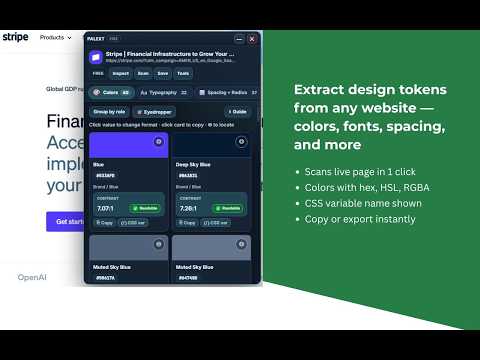
Extract design tokens from any website. Export to CSS, Tailwind, Figma, MUI & more. Inspect elements, audit, and compare snapshots.
Palext scans any live website and extracts its full design system — colors, typography, spacing, radius, shadows, gradients, and CSS variables — then lets you inspect, compare, audit, and export everything in the formats your team actually uses. ── WHAT IT DOES ── ▸ One-click token extraction from any http/https page ▸ Inspect any element and see its design tokens instantly ▸ Compare snapshots with an interactive drift dashboard ▸ Generate audit reports (Markdown + visual HTML) ▸ Export in 12+ formats out of the box ── EXPORT FORMATS ── Web: CSS Variables · SCSS · Less · Stylus · Tailwind Config React UI: Material-UI (MUI) · Chakra UI · Ant Design Design Tools: Figma Tokens JSON · DTCG Standard: JSON · JavaScript · TypeScript ── TOKEN CATEGORIES ── Colors · Typography (fonts, sizes, weights, line heights) Spacing & Radius · Shadows & Gradients · Motion & Transitions CSS Custom Properties (:root variables) · Assets (images, SVGs, icons) ── INSPECT WORKFLOW ── Click Inspect, hover any element on the page, and Palext captures its full style context — then automatically returns you to the panel. No manual DevTools digging required. ── SNAPSHOT HISTORY & DRIFT COMPARE ── Save page states as snapshots, then diff them side by side with an interactive card-based dashboard. Filter by impact level, see added/removed tokens, and track design drift across versions. ── ACCESSIBILITY & INSIGHTS ── ▸ WCAG contrast overlay — see failures highlighted live on the page ▸ Full design score analyzer with pillar breakdown ▸ Accessibility task packs with specific fix recommendations ▸ Component impact map showing highest-risk UI areas ▸ Quick-fix suggestions for contrast and token inconsistencies ── AUDIT REPORTS ── Generate Markdown reports (paste into Notion, GitHub, Jira) or download polished visual HTML audit reports with priority queues, color swatches, contrast pairs, and role-specific action packs — ready for stakeholder reviews without any extra tooling. ── MEASURE MODE ── Click any two elements on the page to measure spacing distances and verify layout precision directly in the browser. ── FREE vs PRO ── Free includes: • 10 scans/month · 3 saved snapshots · 3 measurements/day • Core exports: CSS, SCSS, JSON • Inspect mode · Layout overlay · Color blindness preview · Basic insights Pro includes everything in Free, plus: • Unlimited scans, snapshots, and measurements • Advanced exports: Tailwind, JS, TS, Less, Stylus • React UI exports: MUI, Chakra UI, Ant Design • Figma Tokens + DTCG export • Audit report export (Markdown + HTML) • Asset extraction · Snapshot drift compare · Cross-page crawl • Component impact map · Accessibility task packs • Insights recommendations · Smart Apply preview • Theme personalization ── KEYBOARD SHORTCUT ── Open Palext with Ctrl+Shift+Y (⌘+Shift+Y on Mac). Customizable from chrome://extensions/shortcuts. ── PRIVACY ── Palext reads page styles locally in your browser. No page content, personal data, or browsing history is sent to external servers. License validation uses the LemonSqueezy API only. See full privacy policy at https://palext.vercel.app/privacy.html
0 out of 5No ratings
Details
- Version1.0.1
- UpdatedAugust 12, 2026
- Size156KiB
- LanguagesEnglish
- DeveloperWebsite
Email
pkrdey93@gmail.com - Non-traderThis developer has not identified itself as a trader. For consumers in the European Union, please note that consumer rights do not apply to contracts between you and this developer.
Privacy

Palext — Design Token Extractor has disclosed the following information regarding the collection and usage of your data. More detailed information can be found in the developer's privacy policy.
Palext — Design Token Extractor handles the following:
This developer declares that your data is
- Not being sold to third parties, outside of the approved use cases
- Not being used or transferred for purposes that are unrelated to the item's core functionality
- Not being used or transferred to determine creditworthiness or for lending purposes