Item logo image for Palette for Canvas LMS: Bulk Edit + Accessibility

Palette for Canvas LMS: Bulk Edit + Accessibility

Item media 6 (screenshot) for Palette for Canvas LMS: Bulk Edit + Accessibility
Item video thumbnail
Item media 2 (screenshot) for Palette for Canvas LMS: Bulk Edit + Accessibility
Item media 3 (screenshot) for Palette for Canvas LMS: Bulk Edit + Accessibility
Item media 4 (screenshot) for Palette for Canvas LMS: Bulk Edit + Accessibility
Item media 5 (screenshot) for Palette for Canvas LMS: Bulk Edit + Accessibility
Item media 6 (screenshot) for Palette for Canvas LMS: Bulk Edit + Accessibility
Item video thumbnail
Item media 2 (screenshot) for Palette for Canvas LMS: Bulk Edit + Accessibility
Item media 3 (screenshot) for Palette for Canvas LMS: Bulk Edit + Accessibility
Item media 4 (screenshot) for Palette for Canvas LMS: Bulk Edit + Accessibility
Item media 5 (screenshot) for Palette for Canvas LMS: Bulk Edit + Accessibility
Item media 6 (screenshot) for Palette for Canvas LMS: Bulk Edit + Accessibility

Overview

Canvas LMS toolkit for instructors: batch edit content, shift dates, run accessibility fixes, and execute workflows with AI.

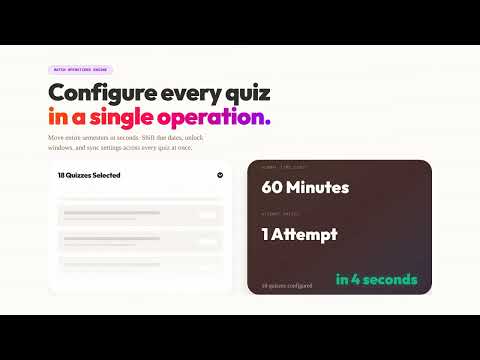
Canvas LMS bulk editing and accessibility remediation for instructors, instructional designers, and course admins. Palette combines three workflows in one Chrome extension: - Batch Operations Engine: bulk update assignments/pages/discussions, run find and replace, shift dates for new terms, and publish/unpublish in bulk. - In-Editor Accessibility Toolbar: scan Canvas RCE content, prioritize issues by severity, run Fix All for supported checks, and review Diff Preview before applying. - AI Command Center (Pro): describe the outcome in plain language and execute multi-step Canvas workflows with reviewable results. Common workflows Palette solves: - Canvas bulk edit assignments and pages - Canvas find and replace across course content - Canvas date shift for term rollover - Canvas accessibility checker and guided fixes - Canvas AI alt text generation (optional Pro feature) How it works: 1) Install Palette from the Chrome Web Store 2) Open any Canvas course 3) Use the side panel to run batch operations, accessibility scans, or AI workflows 4) Review changes and apply with snapshots/activity logs for rollback confidence Why teams choose Palette: - Built for instructor and instructional design workflows (not student theming) - Uses your existing Canvas session (no API token setup required) - Optional AI features are request-based, not always-on background processing Privacy and security: - Core Canvas actions run from your browser to your Canvas instance - Optional account/AI/analytics features use Supabase, Stripe, and OpenAI only for requested capabilities - No ads and no sale of personal data Pricing: - Free: Explore tools, scans/reports, and previews - Plus ($14.99/mo with free trial): Full batch editing, date shift, find/replace, and guided accessibility fixes - Pro ($24.99/mo with free trial): Everything in Plus plus AI Command Center, AI alt text, cross-course workflows, and priority support Requirements: - Google Chrome (114+) - Canvas LMS account (*.instructure.com or *.inscloudgate.net) - Instructor, TA, or instructional designer permissions Support: https://workwithpalette.com

Details

  • Version
    1.1.1
  • Updated
    March 3, 2026
  • Size
    1.35MiB
  • Languages
    English
  • Developer
    Tamitu Solutions LLC
    307 East 6th Street Davenport, IA 52803 US
    Website
    Email
    info@workwithpalette.com
    Phone
    +1 870-897-4589
  • Trader
    This developer has identified itself as a trader per the definition from the European Union and committed to only offer products or services that comply with EU laws.
  • D-U-N-S
    140965031

Privacy

Manage extensions and learn how they're being used in your organization

Palette for Canvas LMS: Bulk Edit + Accessibility has disclosed the following information regarding the collection and usage of your data. More detailed information can be found in the developer's privacy policy.

Palette for Canvas LMS: Bulk Edit + Accessibility handles the following:

Personally identifiable information
Authentication information
Website content

This developer declares that your data is

  • Not being sold to third parties, outside of the approved use cases
  • Not being used or transferred for purposes that are unrelated to the item's core functionality
  • Not being used or transferred to determine creditworthiness or for lending purposes

Support

For help with questions, suggestions, or problems, visit the developer's support site

Related

Ophel Atlas - AI Chat Organizer & Navigator

4.9

Turn AI chats into readable, navigable knowledge. Use outlines, folders, and prompts to organize your workflow and stop scrolling.

Whisk Automation for bulk image generation & Auto prompt for Whisk AI

5.0

Bulk AI image generation for Google Whisk AI. Auto prompt processing & local asset capture to scale your synthetic imagery workflow.

SubflowAI

5.0

The intelligent writing assistant for Substack. Draft, refine, and schedule Notes with AI-powered tools.

Canvas+

4.0

CanvasPlus: Power up your learning with color themes, navigation shortcuts, and improved performance.

FillApp: AI Browser Agent

4.4

AI browser agent that runs in your session. Fill forms, automate multi-tab workflows, handle data entry, and summarize content.

Doc Edit Replay - AI Detector & Originality Checker for Google Docs

5.0

The ultimate revision history tool for Google Docs. Replay edits & use AI to verify originality and detect AI-written content

DeepMaker - AI Image Editing and Creative Tools

5.0

Advanced AI tools for image editing, enhancement, and generation. Create, edit, and transform images with cutting-edge AI models.

Trupeer AI Screen Recorder & Video Editor

4.7

Screen record, edit, annotate, translate and create professional product videos and step by step guides in seconds

智写流程: 操作文档生成,页面截图,SOPs

4.7

自动捕捉你在网页上的每一步操作,并实时生成一份结构清晰、图文并茂的操作指南。你只需“像平常一样操作一遍”,它就能替你生成一份别人一看就能学会的“傻瓜式教程”。

Meta AI Media Automator – Batch Image & Video Generator

0.0

Automate Meta AI batch processing: create images, generate videos, or animate images with prompts and timed scheduling.

TabAI — AI Task manager for All Your Tools

4.8

Collect tasks from Notion, Gmail, Slack & 1000+ tools. Stay focused with AI knowing how you work, and reduce workspace chaos.

Copilot: AI Assistant Powered by ChatGPT, GPT-4o, Claude, Gemini + AI Tools

3.8

AI-enhanced productivity extension with personal tutoring utilising ChatGPT, Claude, and Gemini, plus AI tools and AI images.

Ophel Atlas - AI Chat Organizer & Navigator

4.9

Turn AI chats into readable, navigable knowledge. Use outlines, folders, and prompts to organize your workflow and stop scrolling.

Whisk Automation for bulk image generation & Auto prompt for Whisk AI

5.0

Bulk AI image generation for Google Whisk AI. Auto prompt processing & local asset capture to scale your synthetic imagery workflow.

SubflowAI

5.0

The intelligent writing assistant for Substack. Draft, refine, and schedule Notes with AI-powered tools.

Canvas+

4.0

CanvasPlus: Power up your learning with color themes, navigation shortcuts, and improved performance.

FillApp: AI Browser Agent

4.4

AI browser agent that runs in your session. Fill forms, automate multi-tab workflows, handle data entry, and summarize content.

Doc Edit Replay - AI Detector & Originality Checker for Google Docs

5.0

The ultimate revision history tool for Google Docs. Replay edits & use AI to verify originality and detect AI-written content

DeepMaker - AI Image Editing and Creative Tools

5.0

Advanced AI tools for image editing, enhancement, and generation. Create, edit, and transform images with cutting-edge AI models.

Trupeer AI Screen Recorder & Video Editor

4.7

Screen record, edit, annotate, translate and create professional product videos and step by step guides in seconds

Google apps
