


Overview
Extensão premium para inteligência e arquitetura de cores.
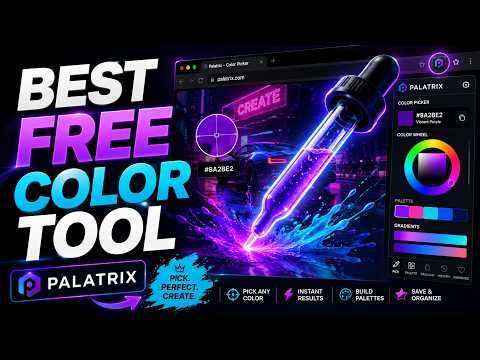
Palatrix is the ultimate all-in-one color intelligence workstation designed directly into your browser. Engineered as a premium frontend developer tool and advanced UI/UX design companion, Palatrix eliminates the need to jump between multiple websites or standalone apps just to inspect element code, build schemes, check compliance, or write background styling syntax. Whether you need a quick hex color code or a comprehensive web inspection, Palatrix runs 100% locally on your machine to ensure blazing-fast performance with zero impact on your browser's speed and absolute user privacy. 🔥 COMPREHENSIVE FEATURES BUILT FOR PRODUCTION 1. Advanced Eyedropper Tool & Floating HUD Experience a surgical-level precision browser companion that goes far beyond a basic Mac color picker for Chrome. • Precision Loupe: Activate a magnifying crosshair cursor to inspect and capture the exact pixel color from any live element. • Dynamic HUD Panel: A floating display follows your cursor navigation, rendering real-time HEX, RGB, HSL values, and the active DOM HTML element tag. • Instant Extraction: One click instantly saves the value to your history ledger and copies the formatted hex color code to your clipboard. 2. CSS Color Extractor & Analyzer Deconstruct the visual identity of any web platform you love with a single click. • DOM Stylesheet Scanning: Palatrix scans the active page structure to read every CSS style attribute used across text layers, borders, and background-color definitions. • Structured Color Palette Generator: Automatically filters out duplicate variables and transparent nodes, rendering a clean, actionable pill-bar of color swatches. • Code-Ready Export: Use the "Copy All" function to instantly export the selected palette straight into your stylesheet as production-ready CSS variables. 3. The Sidepanel Color Workstation (The Color Lab) Open your fluid browser sidepanel to access a comprehensive design studio without ever closing or switching your active tab. • Extract Color From Image: Drag and drop, paste, or link an asset file. Palatrix uses local canvas rendering to process the image, automatically isolating the top 5 dominant shades to build a beautiful visual mood board. • WCAG Contrast Checker & Accessibility Tester: Ensure your user experience meets strict international W3C compliance. Test text visibility against background layers using official luminance formulas, getting real-time Pass/Fail indicators for AA and AAA rating criteria. Bonus: View the exact opposite contrast spectrum on the color wheel for instant compliance suggestions. • Fluid Gradient Generator: Craft complex multi-color linear, radial, and conic gradients. Adjust precise angles, add infinite color stops, and copy the background styling syntax instantly into your text editor. • Mathematical Color Harmony: Select any base color to automatically calculate smart color harmonies, producing complementary, triadic, tetradic, and analogous palettes instantly. 4. Smart History & Palette Management • Quick-Access Memory: The popup dashboard caches your most recent selections, giving you immediate access to translate values through our integrated RGB converter. • Local Storage Saves: Save your favorite custom color combinations directly inside your browser cache to use across separate development sessions and layout projects. 5. Dynamic Toolbar Icon (Alpha Masking) Palatrix changes how your browser feels. Utilizing OffscreenCanvas alpha masking, the extension’s toolbar icon dynamically mutates its transparent areas to match your exact picked color. You can instantly verify your active color just by glancing at your browser header bar. ⚡ THE PALATRIX ADVANCE: 100% LOCAL & PRIVATE • Zero External Tracking: Palatrix operates fully on your computer. No user accounts, no tracking cookies, no server connections, and absolutely no data collection. • Manifest V3 Architecture: Built natively using optimized Vanilla JavaScript to keep your workflow lightweight and clean. • Seamless Multilingual Support: Automatically translates its user interface text across English, Portuguese, and Spanish based on your browser locale. WHO IS PALATRIX FOR? • Frontend Developers: Instantly grab CSS variable scripts, design complex background layers, and audit live production code rules. • UI/UX & Web Designers: Create cohesive branding palettes, extract image assets, analyze contrast compliance ratios, and export clean tokens straight to your Figma workspace. • Digital Content Creators: Maintain strict brand color uniformity across web platforms and visual social assets. Streamline your production engineering, fix contrast mistakes, and elevate your web architecture with Palatrix!
5 out of 51 rating
Details
- Version1.0.10
- UpdatedJuly 9, 2026
- Size65.1KiB
- LanguagesEnglish (United States)
- DeveloperWebsite
Email
contato@automasix.com.br - Non-traderThis developer has not identified itself as a trader. For consumers in the European Union, please note that consumer rights do not apply to contracts between you and this developer.
Privacy

This developer declares that your data is
- Not being sold to third parties, outside of the approved use cases
- Not being used or transferred for purposes that are unrelated to the item's core functionality
- Not being used or transferred to determine creditworthiness or for lending purposes