


Overview
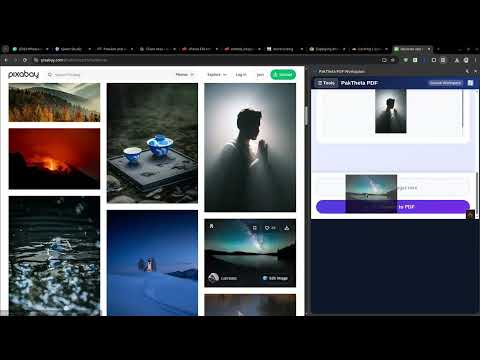
Convert images to PDF seamlessly via right-click.
PakTheta PDF Workspace is a lightweight and efficient browser extension designed to streamline your workflow by allowing you to convert images to PDF documents seamlessly, right from your browser. Tired of downloading images and then using third-party online converters to create a PDF? PakTheta PDF Workspace eliminates the hassle. Simply right-click on any image on a webpage, select our extension from the context menu, and instantly generate a PDF. 🌟 Key Features: - Seamless Right-Click Conversion: Convert any web image to PDF instantly using the context menu. No need to download the image to your device first. - Fast & Lightweight: Optimized for speed, ensuring your browser runs smoothly without any lag. - Wide Format Support: Works with all standard image formats, including JPEG, PNG, WebP, GIF, and more. - Privacy-Focused: Your documents are processed securely, keeping your data safe and private. - User-Friendly Interface: Clean and intuitive design that gets out of your way and lets you focus on your work. 💡 Why Install PakTheta PDF Workspace? Whether you are a student, professional, researcher, or casual user, saving web images as PDFs is a common task. This extension saves you time and multiple clicks by integrating directly into your browsing experience. Boost your productivity and manage your digital documents effortlessly! Start converting images to PDFs in seconds. Install PakTheta PDF Workspace today!
5 out of 51 rating
Details
- Version1.4
- UpdatedJune 18, 2026
- Size26.24KiB
- Languages6 languages
- DeveloperNauman AhmadWebsite
HOUSE NO 4 GALA CHOUDHARY KASHIF WALA, OPP/GARDEN TOWN mohalla gusia abad Gujranwala Punjab Punjab Pakistan Gujranwala 52250 PKEmail
vuhomework22@gmail.comPhone
+92 345 6218851 - TraderThis developer has identified itself as a trader per the definition from the European Union and committed to only offer products or services that comply with EU laws.
Privacy

This developer declares that your data is
- Not being sold to third parties, outside of the approved use cases
- Not being used or transferred for purposes that are unrelated to the item's core functionality
- Not being used or transferred to determine creditworthiness or for lending purposes
Support
For help with questions, suggestions, or problems, visit the developer's support site