


Overview
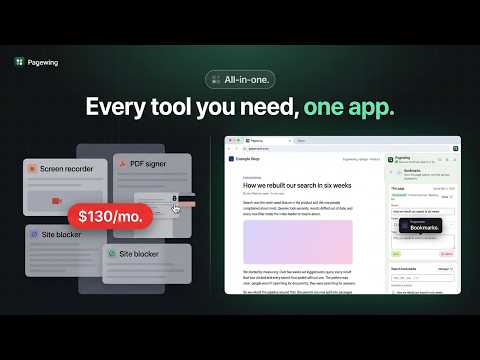
Record your screen, make step-by-step guides, edit screenshots, images and PDFs, and manage bookmarks and tabs in one side panel.
Pagewing is a productivity side panel for working with the web pages you visit. Its screen recorder captures your screen, camera and microphone, and gives you a share link the moment you stop. Its PDF editor opens the PDFs you find on the web or your computer, so you can annotate, fill in, sign, organize and convert them without leaving your browser. The same panel captures and marks up screenshots, turns a task into a step-by-step guide, organizes your bookmarks and tabs, and keeps your notes, templates and timers at hand. Every tool is free to use with a few limits, and one subscription removes them all. SCREEN RECORDER You could show it in a minute, but writing it out takes twenty. Pagewing's screen recorder records a tab, a window, your whole screen or just your camera, and shares it with a link the moment you stop. • Add a camera bubble, record tab or system audio with your microphone, and choose up to source resolution at 30 or 60 fps, or Sharp quality on Premium for crisp text. • Record just part of a tab, or a long page as it scrolls itself, and read your script from a teleprompter that tab recordings don't show. • While you record, highlight your clicks, spotlight the pointer, draw on the page and blur private details, with push to talk for the microphone. • Save the video as MP4 or WebM, or share a link that uploads while you record (Premium), with an optional password and expiry date. • Viewers can comment and react on the timeline, and you can see who watched and how far. • Shared recordings get captions, a searchable transcript and an AI title from what you said. • With Pro, AI writes a summary, chapters and action items for each shared recording, and your share pages carry your logo and a call-to-action button. • Trim and cut on a waveform in your online library, zoom in on your clicks automatically, add a background and a size for any social feed, and export MP4 or GIF. PDF EDITOR A PDF to sign, and every editor wants an upload, an account or a subscription first. Pagewing's PDF editor opens any PDF from the web or from your computer, so you can read, annotate, fill in, sign and edit it. • Your PDFs never leave your computer unless you save them to your Pagewing cloud. Viewing and editing are unlimited and free; without a subscription you can save 3 PDFs a day. • Highlight, underline, comment, add text and draw on any page. • Fill in forms and sign with a drawn, typed or uploaded signature. • Reorder, rotate, delete and insert pages; merge, split, compress and add or remove a password. • Convert PDFs to DOCX, XLSX, PPTX, images or text, and turn images or text into a PDF. • Optionally open the PDFs you click on websites in the PDF editor instead of Chrome's viewer. FULL PAGE SCREENSHOT The screenshot cuts off halfway, and the long chat you need won't fit in one shot. Capture a full page, any scrolling panel inside it, the visible area or an area you select, then mark it up in the editor. • Full-page capture is free: the page is stitched for you, sticky headers show only once, a chat loads its earlier messages first, and very tall pages are split into parts. • Add arrows, text, shapes, highlights and numbered steps, and blur anything private. • Download as PNG, JPG or WebP, or as a PDF stamped with the page's address and the date, or copy straight to the clipboard. • With a subscription, share a screenshot as a link that lasts a day, a week, a month or for good, with an optional password; edits show up on it, and you can turn it off any time. STEP-BY-STEP GUIDES Explaining the same steps to a colleague again and again? Turn a task you do in Chrome into a step-by-step guide with a screenshot of every step. • Start capturing and do the task as usual: each click becomes a step with a screenshot, a marker and a line like "Click Save"; what you type is never recorded. • Edit the guide on the Pagewing website: rewrite, reorder, merge or delete steps, and crop, blur or draw on any screenshot. • Download it as a PDF, as Markdown with its pictures, or as one HTML file. Premium adds share links, version history, AI-written step text and your Pagewing cloud. IMAGE EDITOR AND IMAGE DOWNLOADER Need every image from a page, or a quick crop, without an image editor? See every image on the page you're on, then download, edit or merge them, all in your browser. • Filter the page's images by size and type, download the ones you pick at once, or right-click any image to edit it. • Crop, adjust, add filters and text, merge images in a row or grid, and resize, convert or compress many at once. BOOKMARK MANAGER Years of bookmarks, half of them dead, and you can never find the one you saved. Organize the Chrome bookmarks you already have, with nothing to move. • Bookmark the current page in one click, straight into the folder its site already uses. • Add tags, notes and page previews, and search with filters by site, folder and date, or on Premium by words on the pages. • Find duplicates, broken links and bookmarks you never open, with regular checks that tell you when a link breaks. • Manage everything in the full manager on the Pagewing website, with drag and drop, undo and, on Premium, bulk actions. TAB MANAGER AND SESSION SAVER Twenty tabs open for a project, and closing them feels like losing work? Save your open tabs as named sessions, close them to free up memory, and bring them back whenever you need them. • Save one window, every window or just the tabs you pick, keeping pinned tabs, tab groups and window names. • Restore in a new window or the current one; big restores open tabs unloaded, so Chrome stays fast. • Your open windows are saved automatically, so you can recover from a crash. • Group a window's tabs by topic with AI, see which tabs look finished with, and let idle tabs unload by themselves. URL SHORTENER WITH QR CODES A long, messy link to share in a message or print on a flyer. Shorten the page you're on or any link in one click, with the short link copied for you. • Choose a custom alias and change where a link points later. • See clicks over time, and on Premium the sites, countries and devices they came from. • Make QR codes in your own size and colors. • No ad pages before the redirect, ever, not even on your printed QR codes. • On Pro, send phones or visitors from chosen countries to their own address, and manage links from your own code with the API. FORM RECOVERY (TEXT RECOVERY) Lost a long form or post to a refresh or a crashed tab? Get back what you typed into a web page after a refresh, a crashed tab, an expired session or a form that errors out. • What you type into text boxes is saved as you go, in your browser, including rich editors in email and chat apps. • Come back to an empty text box and a Restore button puts your text back, or pick an earlier draft. • Passwords, card numbers and one-time codes are never saved, and you can turn off any site. TEXT EXPANDER AND TEMPLATES Typing the same reply for the tenth time today? Save the replies, signatures and snippets you type again and again, and insert them anywhere. • Type a short shortcut in any text box to insert a template. • Add automatic dates and the current page's link, and blanks to fill in on Premium. • Let AI write one part of a template from the rest of it, on Premium. • Import snippets from other text expanders or a spreadsheet, with their shortcuts and folders, and export yours any time. VIDEO SPEED CONTROLLER Stuck with a video player that won't go faster than 2x? Set one playback speed for every video and audio player, from 0.07× to 16×. • Voices keep their natural pitch, and your speed returns when a site resets it. • Boost the volume to 300% (600% and a pitch shift on Premium), and pan the sound or play it in mono. • Control everything with shortcuts you can change, and on Premium set a different speed for any site. WEBSITE BLOCKER AND FOCUS MODE Opened a distracting site again without meaning to? Block distracting websites with a calm pause, then choose to go back or continue for a set number of minutes. • Block up to 500 sites in each list for free: whole sites or one section of a site, or allow only a list of sites. • Group sites into block sets with their own weekly schedule and a daily or hourly allowance, like 30 minutes of video a day. • Start a focus session or a strict session that can't be skipped, and make turning focus mode off take a typed code or a wait. • The addresses you visit are checked on your device, and we never sell your browsing. READ LATER AND HIGHLIGHTS Found a good article at the wrong time to read it? Save articles to read later and highlight the parts that matter. • Save any page or link in one click, and Pagewing keeps a clean copy of the text. • Highlight text on any web page in five colors and see your highlights when you return; add notes to them on Premium. • Read in a distraction-free reader that remembers where you stopped, and export your highlights as Markdown. • Get an AI summary of an article, ask it questions or have a passage explained, from the article's own text. NOTES Your notes are in one app, the page in another, and you've lost where that quote came from. Private notes and highlights in a side panel, for the page or site you're on. • Clip selected text as a quote with its link, and cite pages in APA, MLA or Chicago. • Use pins, tags and Markdown with checklists. PAGE MARKER Trying to point at one spot on a page during a call? Draw on any page, then screenshot, record or save it as a PDF. • Pen, highlighter, arrows, shapes, text and a laser pointer for screen sharing. • Your marks are saved per page and come back when you return. EVERYTHING SAVED ABOUT A PAGE Saved screenshots, notes and bookmarks for the same page in different tools, with no way to see them together? Open the This page tab to see the screenshots, marks, highlights, notes, bookmarks and other items your Pagewing tools saved for the page you're on, grouped by tool. • Bookmark it, save it to Read later, take a screenshot, add a note or mark it up from the same tab. • The Pagewing website lists every page you saved something about. It's free, and a PDF summary of a page is part of Premium. AUTOSCROLL Reading a long page or a script on camera, and scrolling by hand every few lines? Scroll any page hands-free, up or down, smooth at any speed and on any panel. • A teleprompter mode shows the page or your script in large, mirrored type. AI WRITER Staring at an empty reply box, or rewriting one sentence three times? Write, rewrite and reply with AI in any text box, and see the result before it goes in. • Type // and what you need, such as "//a polite follow-up asking for the invoice", in any text box. • Select text to rephrase, shorten, expand, fix spelling and grammar, change its tone or translate it. • Draft replies from the email thread you have open in your webmail. TIME TRACKER Billing a client and guessing how long the work took? Track time on tasks and projects with a timer in your side panel and on the toolbar. • Add projects, clients, tags and billable time. • Start a timer from a button on issue, card and task pages in the work apps you turn on, with the issue's key and title filled in. • Idle detection, a Pomodoro timer and reminders to start tracking. • Timesheets, a calendar view and reports, with CSV, XLSX and PDF export. EMAIL TRACKER FOR GMAIL Sent an important email and wondering if anyone opened it? See when the emails you send from Gmail are opened, with no ads in your signature and opens you can trust. • One check mark when your email is sent and two once it's opened, with a notification each time. • Track link clicks, and on Premium get a reminder when nobody has replied. • Automatic opens are left out, and opens a mail app's privacy protection may have made are marked as possibly automatic. REMINDERS Remembered something important, then forgot it by the afternoon? Type a reminder the way you'd say it, such as "call mom tomorrow at 5pm". • Attach the page you're on, so the reminder takes you back to it. • Repeat reminders daily, weekly, monthly or yearly. • Get a notification on time, with Done and Snooze, even with the side panel closed, and an email too on Premium. HISTORY AND CACHE CLEANER A site misbehaving until you clear its cookies and cache? Clear your history, cache and cookies in one click or with a shortcut. • Keep the sites you trust signed in. • Clear just the site you're on, or clean automatically when Chrome starts and on a schedule. STOPWATCH AND TIMER Need a quick timer without opening another site? A stopwatch with laps, a timer, and a Pomodoro that turns on focus mode. Timers ring with the panel closed. PRICING Every tool is free to use, with a few limits: 15-minute recordings, 3 saved PDFs a day, 25 short links, 25 saved tab sessions, 50 notes, 20 templates, saved marks on 10 pages, 250 saved articles, link tracking on 10 emails a month, 10 AI writer requests a day, 10 images at a time in the image tools, 10 saved guides, and a week of text recovery. Sign in with Google or your email to start free; you stay free unless you upgrade. Pagewing Premium ($20/month or $200/year, cancel anytime) removes the free plan's limits and adds the paid features in each tool, such as share links for recordings, screenshots and guides, recording edits, scrolling-panel captures, custom short links, PDF signatures, per-site video speeds, link tracking on every email, billable time, up to 500 AI writer requests a day, a year of text recovery, and cloud storage. Pagewing Pro ($30/month or $300/year) has everything in Premium plus AI summaries and chapters for shared recordings, your logo on share pages, conversions to DOCX, XLSX and PPTX, the bookmark broken-link check and duplicate cleanup, invoices from tracked time, and short-link redirects and API. Both work on up to 5 browsers. Paid plans keep a few limits, such as cloud storage space, all listed on the pricing page. PRIVACY • Before anything goes to your account, Pagewing shows you what it keeps and why, and asks you to agree. • Bookmarks, page marks, the text recovery keeps as you type and automatic tab snapshots stay on your computer. PDFs, recordings and guides do too, unless you save or share them to your Pagewing cloud; a shared tab recording carries where you clicked, never what you typed. • Tab sessions you save, templates, short links and their clicks, reminders, focus lists, tracked time, Read later articles, synced notes and, if you turn on page search, your bookmarked pages' text are kept in your account, so every browser you sign in to gets them. • The email tracker stores each email's subject, recipients and open times, never the message itself. • AI features send text only when you use them: the AI writer, article summaries and questions, tab grouping, recording titles and summaries and guide step text send what they work on to the AI model. • If you turn it on, video speed keeps the names of sites where media played and for how long, for your time-saved stats. • If you turn it on, Pagewing counts which tools you use each day, shown on your account page, never what you used them on. • Pagewing counts which features you use, never page content; turn it off in Settings. • No ads, and no third-party analytics or tracking in the extension. Privacy policy: https://pagewing.appzlr.com/privacy QUESTIONS Does it work on every site? It works on normal web pages. Chrome doesn't let extensions run on its own pages or on the Chrome Web Store. Which computers does it work on? Chrome 116 or later on Windows, macOS, Linux and ChromeOS. Website: https://pagewing.appzlr.com/?utm_source=chrome-web-store&utm_medium=listing Step-by-step guides: https://pagewing.appzlr.com/guides?utm_source=chrome-web-store&utm_medium=listing Help and contact: https://pagewing.appzlr.com/contact?utm_source=chrome-web-store&utm_medium=listing Questions or feedback: tool@appzlr.com
5 out of 55 ratings
Details
- Version1.0.21
- UpdatedNovember 12, 2026
- FeaturesOffers in-app purchases
- Size2.57MiB
- Languages10 languages
- DeveloperWebsite
Email
ac10.origin@gmail.com - Non-traderThis developer has not identified itself as a trader. For consumers in the European Union, please note that consumer rights do not apply to contracts between you and this developer.
Privacy

Pagewing: Screen Recorder & PDF Editor has disclosed the following information regarding the collection and usage of your data. More detailed information can be found in the developer's privacy policy.
Pagewing: Screen Recorder & PDF Editor handles the following:
This developer declares that your data is
- Not being sold to third parties, outside of the approved use cases
- Not being used or transferred for purposes that are unrelated to the item's core functionality
- Not being used or transferred to determine creditworthiness or for lending purposes
Support
For help with questions, suggestions, or problems, visit the developer's support site