Item logo image for PageVS - Split tabs like a pro

PageVS - Split tabs like a pro

https://workbench-extension.netlify.app/
5.0(

2 ratings

)
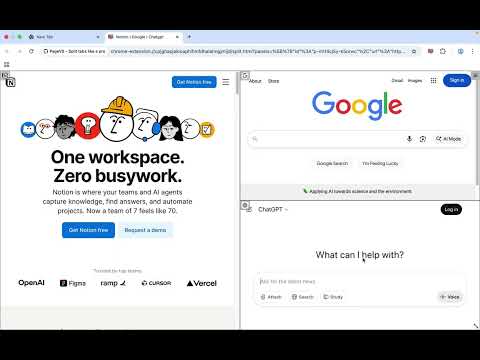
Item media 5 (screenshot) for PageVS - Split tabs like a pro
Item video thumbnail
Item media 2 (screenshot) for PageVS - Split tabs like a pro
Item media 3 (screenshot) for PageVS - Split tabs like a pro
Item media 4 (screenshot) for PageVS - Split tabs like a pro
Item media 5 (screenshot) for PageVS - Split tabs like a pro
Item video thumbnail
Item media 2 (screenshot) for PageVS - Split tabs like a pro
Item media 3 (screenshot) for PageVS - Split tabs like a pro
Item media 4 (screenshot) for PageVS - Split tabs like a pro
Item media 5 (screenshot) for PageVS - Split tabs like a pro

Overview

PageVS can make you split tabs like a pro, boosting your productivity.

🟢 Why We Built PageVS 🟢 Most existing split-screen extensions offer only basic column layouts, with limited customization. Our goal is to make tab splitting simpler and more efficient. 🟢 Core Features 🟢 ● 🖼️ Resize, Drag & Drop each panel to customize your layout freely. ● 💾 Bookmark your layout, and restore it in a single click. ● 🪟 Split up to 16 panels. ● 🌓 Light and dark modes support.

Details

  • Version
    2.3.0
  • Updated
    November 15, 2025
  • Size
    604KiB
  • Languages
    21 languages
  • Developer
    Website
    Email
    linjapyc@gmail.com
  • Non-trader
    This developer has not identified itself as a trader. For consumers in the European Union, please note that consumer rights do not apply to contracts between you and this developer.

Privacy

The developer has disclosed that it will not collect or use your data. To learn more, see the developer’s privacy policy.

This developer declares that your data is

  • Not being sold to third parties, outside of the approved use cases
  • Not being used or transferred for purposes that are unrelated to the item's core functionality
  • Not being used or transferred to determine creditworthiness or for lending purposes

Support

Related

EZ Tabs: Tabs & Bookmarks Manager

5.0

Easy tabs and bookmarks manager with intuitive hotkeys. You can - see a list of tabs opened in current window - open or close a…

SplitPilot - Split Screen for Chrome

5.0

Open two websites side by side in one tab. Multitask faster with a clean split-screen for Google Chrome.

1TabScape: Split tabs into 1 tab, merging all websites.

4.8

A smart tab merging tool that helps you browse multiple websites in the same tab.

Multitask - Split and display pages together

5.0

Create custom layouts to view multiple websites simultaneously. Save URL presets for instant organization.

Lindle: Save, Manage Web Links

5.0

Say goodbye to scattered links and hello to streamlined productivity. All-in-one web link saver and bookmark manager

Split Screen

5.0

Dynamically splits the current tab into multiple windows side by side on the current screen.

Tab Splitter

1.0

Split your browser tab into two panes

Split Screen in Tab - ChatGPT Sidebar

4.4

Split View in One Tab! Multitask with ChatGPT Sidebar!

Split Screen Tabs

5.0

Split current tab and another into two windows side-by-side.

TabSplit

4.5

Split a tab two resizable windows.

Quad Tabs - Split your Browser

0.0

Convert four tabs into separate browser windows with Alt+Shift+Q and remembers the layout per display.

Split Screen Extension

5.0

Split screen functionality for Chrome

EZ Tabs: Tabs & Bookmarks Manager

5.0

Easy tabs and bookmarks manager with intuitive hotkeys. You can - see a list of tabs opened in current window - open or close a…

SplitPilot - Split Screen for Chrome

5.0

Open two websites side by side in one tab. Multitask faster with a clean split-screen for Google Chrome.

1TabScape: Split tabs into 1 tab, merging all websites.

4.8

A smart tab merging tool that helps you browse multiple websites in the same tab.

Multitask - Split and display pages together

5.0

Create custom layouts to view multiple websites simultaneously. Save URL presets for instant organization.

Lindle: Save, Manage Web Links

5.0

Say goodbye to scattered links and hello to streamlined productivity. All-in-one web link saver and bookmark manager

Split Screen

5.0

Dynamically splits the current tab into multiple windows side by side on the current screen.

Tab Splitter

1.0

Split your browser tab into two panes

Split Screen in Tab - ChatGPT Sidebar

4.4

Split View in One Tab! Multitask with ChatGPT Sidebar!

Google apps