


Overview
Capture any website for your PageToVid videos: screencasts, full-page shots, images, brand kits and logged-in sessions.
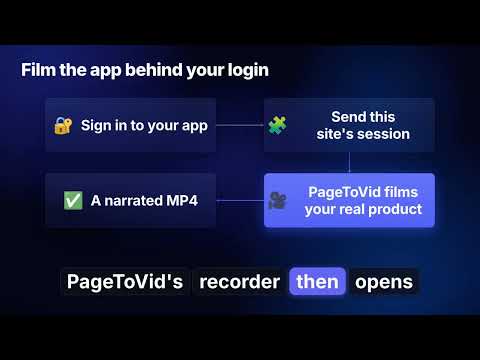
PageToVid Capture is the browser companion of PageToVid (https://pagetovid.com), the service that turns web pages into narrated videos. The extension captures what only your own browser can see — your logged-in product, the exact screens you want, the click path you want to show — and sends it to your PageToVid account, where it becomes a finished, editable video. WHAT THE EXTENSION DOES • Screencasts with a styled cursor Plan a flow — open this page, click that button, type into this search box — and record it one step at a time, with a clean styled cursor. Each step is saved as its own scene, ready to drop into a video. • Full-page and element screenshots Capture a whole page, the visible area, or one element (a pricing table, a chart, a product card) at high resolution. • The page's own images Collect the logos, product photos and illustrations a page already uses, and add them to your PageToVid media bank. • Your brand: colours and fonts Read the site's real colours and typefaces from its CSS, so your videos look like your brand without retyping a single hex code. • Logged-in sessions (film the app behind the login) Most products keep their best screens behind a sign-in, where a cloud recorder cannot go. When you are signed in to your own app, open the side panel and click "Send this site's session": PageToVid's recorder can then open your real product, signed in, and film it. A session covers one site only and expires. Filming behind a login is available on the Scale plan and above. WHAT YOU CAN DO NEXT IN PAGETOVID Everything you capture lands in your PageToVid account, where the rest of the work happens: • Turn a page into a narrated video: PageToVid writes the script, films the site, adds an AI voice-over and captions, and renders an MP4. • Edit everything after the first render: change the words scene by scene, swap a visual, re-film one shot, move scenes, change the voice, the music, the captions or the look — then re-render without starting over. Every edit can be undone. • One video, every format: 16:9 for YouTube and your website, 9:16 for Reels, Shorts and TikTok, 1:1 and 4:5 for feeds. • Translate a finished video into other languages, re-voiced and re-captioned (13 voice languages). • Animate your own content too — figures, notes, a slide deck — with charts, timelines, pricing grids, quotes and motion cards, no web page needed. • Work with your AI assistant: PageToVid connects to Claude, ChatGPT, Cursor, VS Code and other MCP clients, so you can ask for a video, review its storyboard and request changes in plain words. • Teams and reviews: share a review link, collect timestamped comments, run approval rounds. • Publish: download the MP4 and subtitles, or use the share page and embed code. PRIVACY AND PERMISSIONS • Nothing is sent until you click. Everything goes only to your own PageToVid account. • A session is sent only when you ask for it, covers one site, and expires. • The extension asks for access to the sites you choose to capture, to cookies (to connect to your PageToVid account and, on request, to send one site's session) and to navigation events (to follow a flow you are recording). • Optional: if you enter your own Google Gemini API key and run a page review, that screenshot is sent to Google's Gemini API with your key. Without a key, nothing goes to Google. • No data is sold or used for advertising. Privacy policy: https://pagetovid.com/privacy GETTING STARTED 1. Install the extension and pin it. 2. Sign in to PageToVid (a free account works) — the extension connects to it. 3. Open the page you want to capture and click the PageToVid icon to open the side panel. 4. Capture screenshots, record a flow, or send a logged-in session, then make your video at pagetovid.com. Plans: a free account lets you try PageToVid on your own site (AI-generated pictures and clips need a paid plan). Paid plans remove the PageToVid badge and unlock more videos, AI visuals and filming behind a login. See https://pagetovid.com/pricing Questions or feedback: hello@pagetovid.com — guides at https://pagetovid.com/extension
0 out of 5No ratings
Details
- Version2.10.1
- UpdatedOctober 29, 2026
- Size85.95KiB
- LanguagesEnglish (United States)
- DeveloperWebsite
Email
gauthier.bros@gmail.com - Non-traderThis developer has not identified itself as a trader. For consumers in the European Union, please note that consumer rights do not apply to contracts between you and this developer.
Privacy

PageToVid — Capture has disclosed the following information regarding the collection and usage of your data. More detailed information can be found in the developer's privacy policy.
PageToVid — Capture handles the following:
This developer declares that your data is
- Not being sold to third parties, outside of the approved use cases
- Not being used or transferred for purposes that are unrelated to the item's core functionality
- Not being used or transferred to determine creditworthiness or for lending purposes
Support
For help with questions, suggestions, or problems, visit the developer's support site